City of Seattle AI Permitting Design
Where should AI help in a permit application, and how much?
Overview
Seattle’s construction permits are slow and hard to follow. Our team of three started at the City’s permitting hackathon and designed AI help for three steps: the timeline, the form and a review before submitting. In UW’s HCDE 516 we tested how much AI those steps need, with three versions and 42 architects and residents. I built the prototypes, including the full-AI version, and collected and analyzed the study data. Partial AI raised usability by 34% and trust by 39%. Full AI added no significant gain on top.
- +34% usability, partial AI vs. none
- +39% trust, partial AI vs. none
- V2 = V3 full AI added no significant gain
- Role
- UX Design + Research
- Timeline
- Sep 2025 – Dec 2025
- Team
- Yitong Du
- Evanna Yang
- Mengying Wang (me)
- Skills
- AI interaction design
- Experiment design (between-subjects)
- Survey design and analysis
- Vibe-coded prototyping
- Tools
- Figma
- Bolt
- Qualtrics
- R
Problem
In fall 2025 Seattle launched a Responsible AI Plan and a series of community hackathons. The second one opened up the City’s permitting data. For a first-time applicant, a construction permit is slow and confusing.
A new roof needs a permit
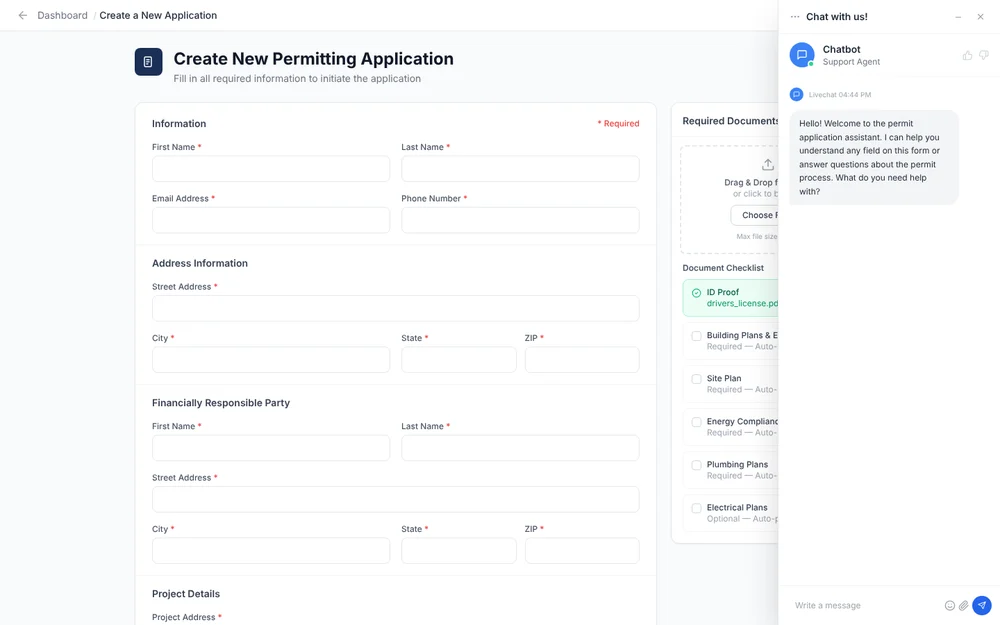
Maria wants to replace her roof. The City’s site lists codes, forms and permit types. She can’t tell which ones apply to her.
No one can say how long
She wants to know how long review will take. Nothing gives her a date she can book a roofer around.
The same details, typed again
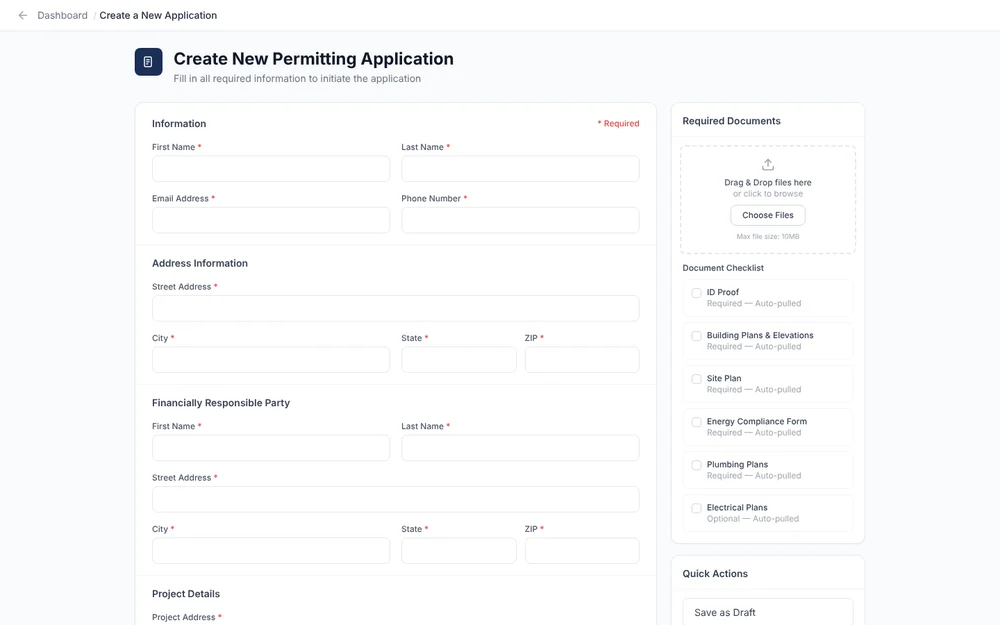
The form asks for dozens of fields. Most answers are already in the documents she uploads.
Corrections, weeks later
A correction notice arrives for something she missed. She fixes it, resubmits and waits again.
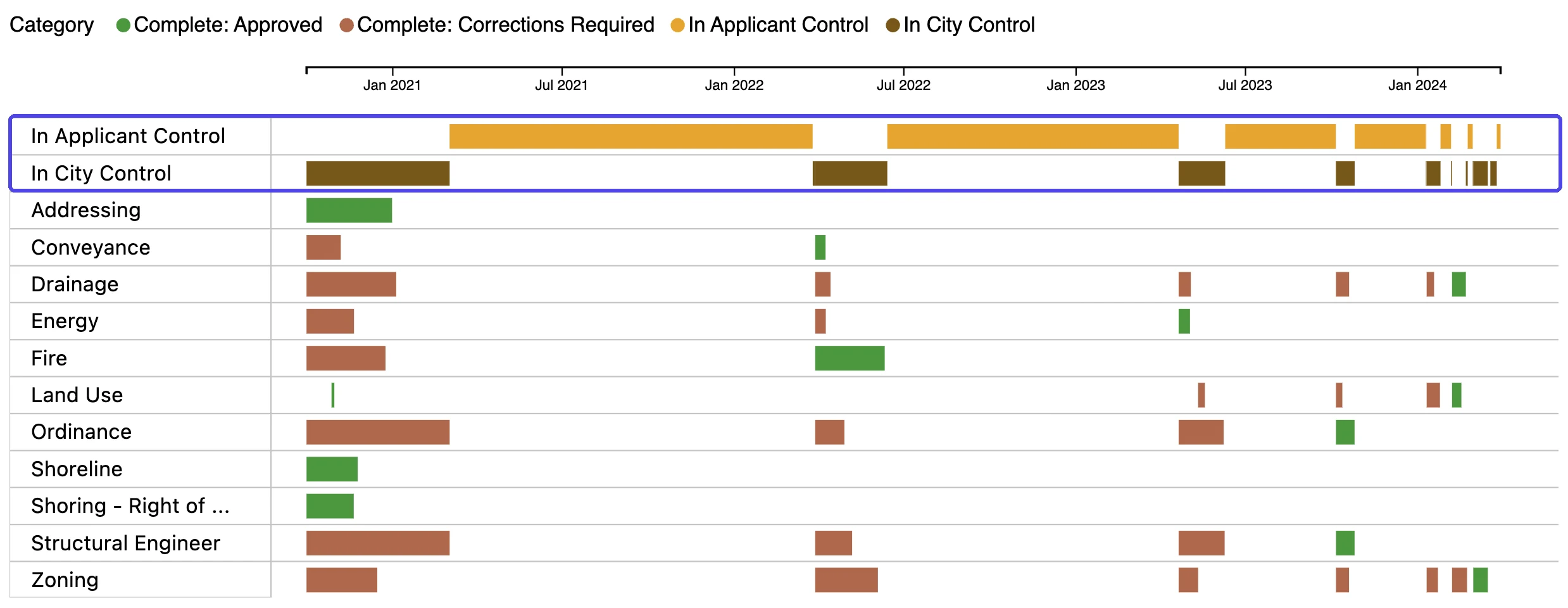
One small mistake can cost weeks. AI could help. The first question was where.
Users
Two very different people file permits. We built both personas from the City’s hackathon brief.
Knows the process
David, architect
Files permits for clients. His drawings and specs already hold the answers. He wants the form to read them and keep his final say.
Needs every step explained
Maria, first-time resident
Is filing her first permit. She can’t tell which rules apply to her and fears a costly mistake.
Principle 1
Show the basis
Every AI output says what it was built from.
Principle 2
AI fills, people decide
Anything AI writes stays marked and editable.
Principle 3
Cite the rule
Every flag points to the code behind it.
Design
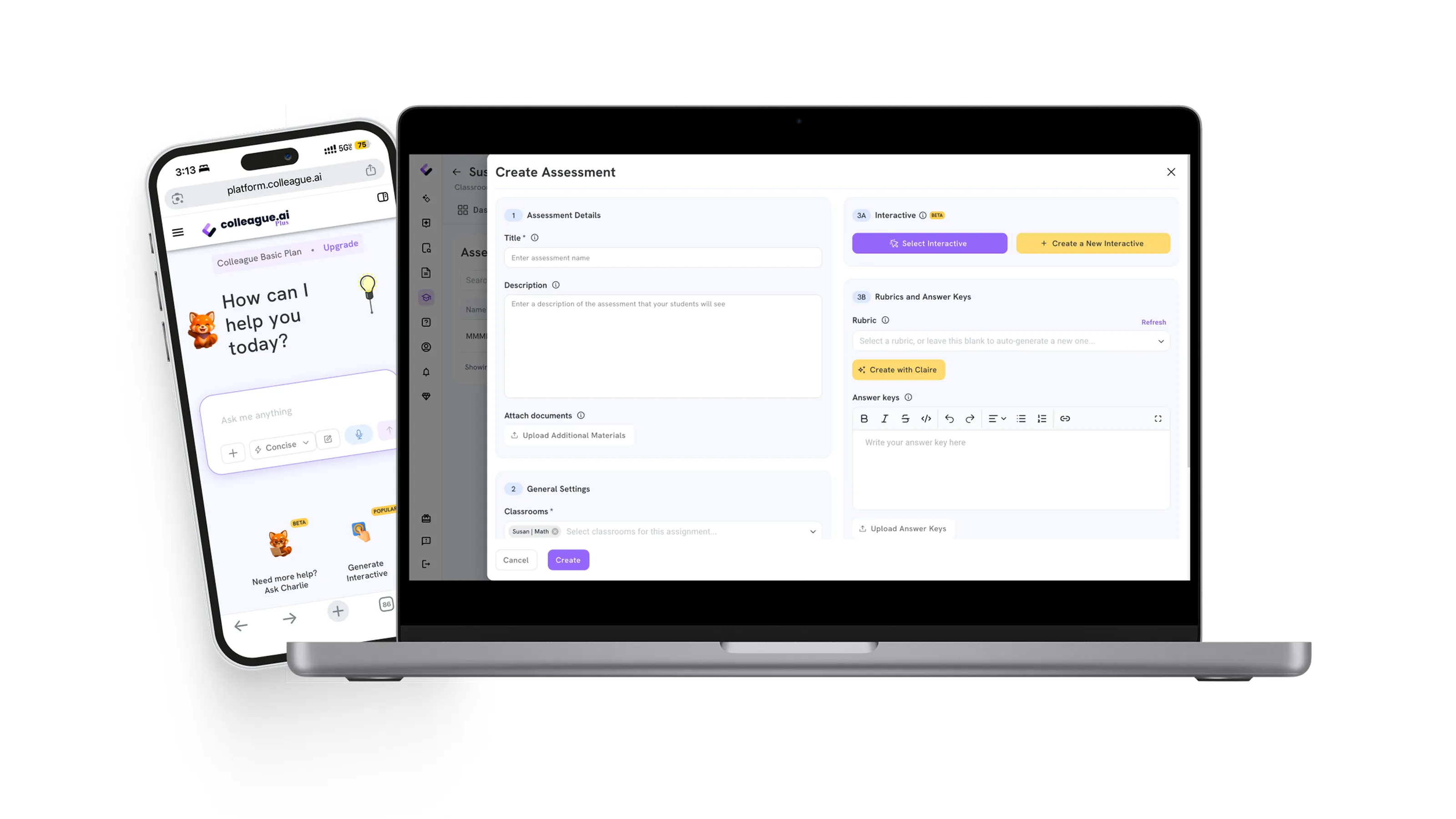
One AI touchpoint at each friction point. The walkthroughs below show the full-AI version. Press play to watch each one.
- Understand requirements
- Estimate timelineUnclear timelines
- Fill applicationEasy to get wrong
- ReviewEasy to miss steps
- Submit
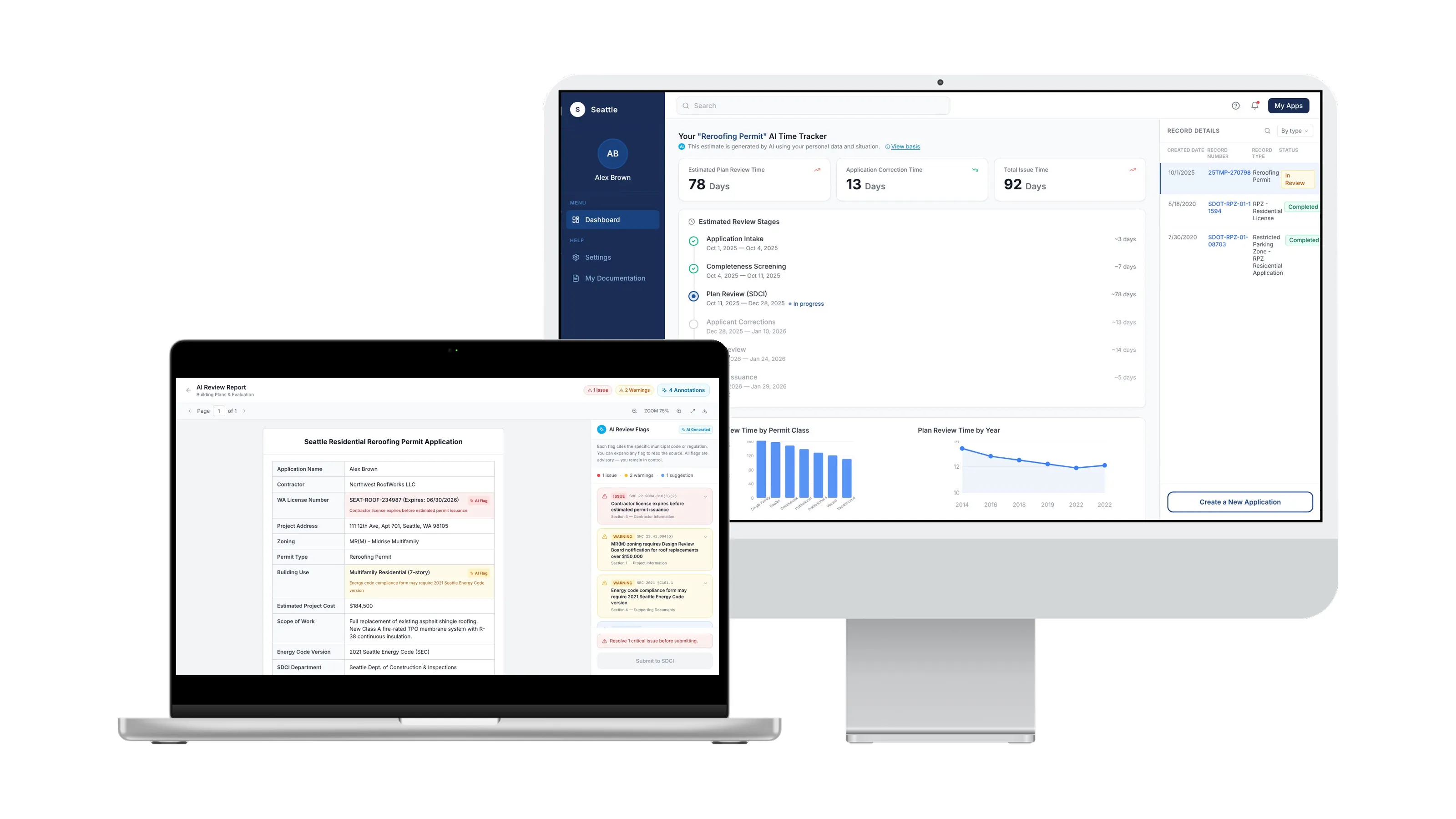
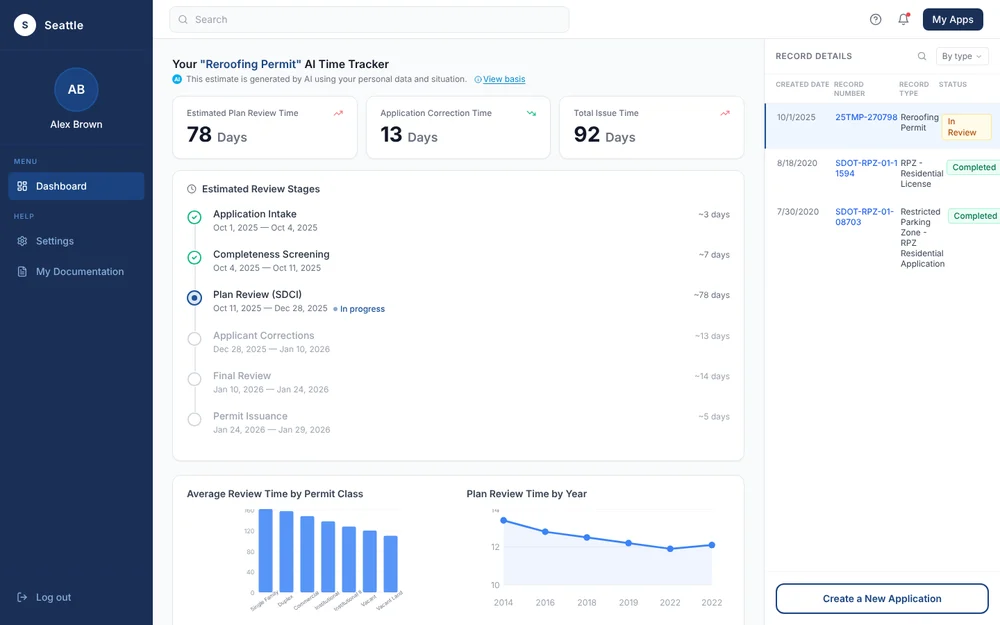
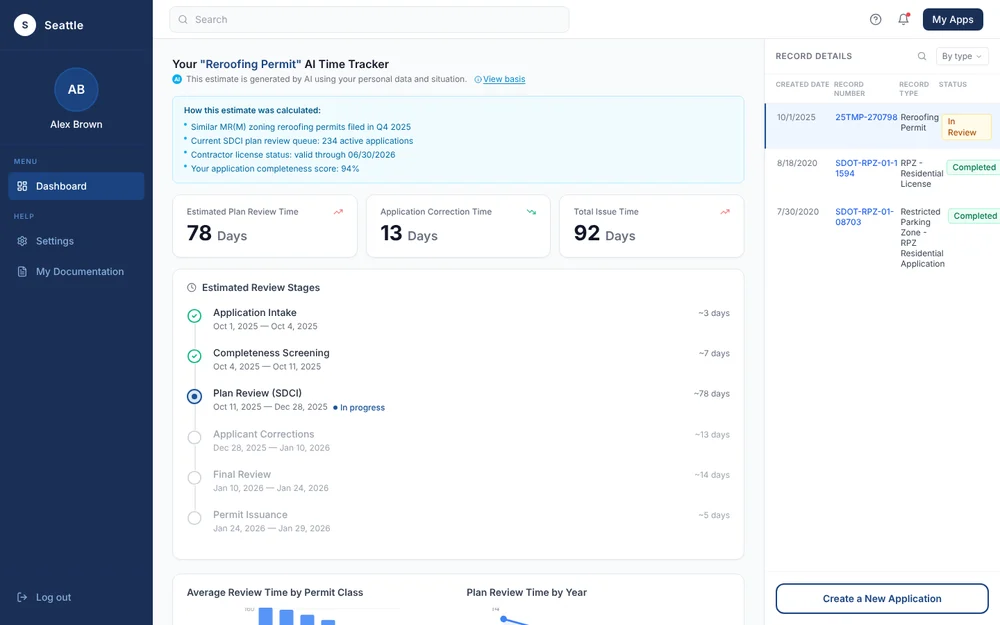
A timeline you can check
Principle: show the basis. A personal estimate by review stage, with how it was calculated one click away.
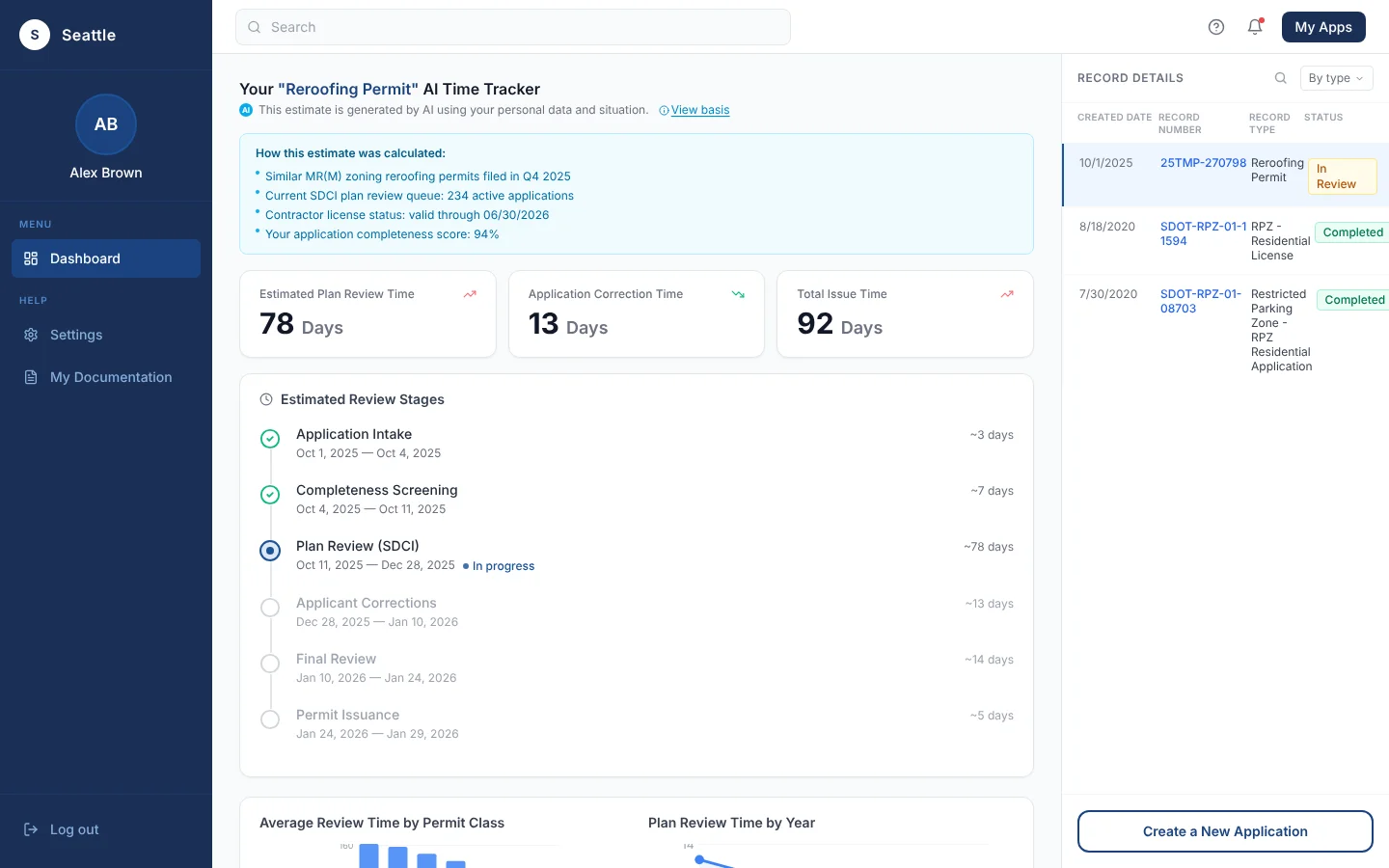
- A personal estimate Built from this applicant’s own record and situation.
- The basis, one click away Similar permits, the current review queue, license status and how complete the application is.
- Three numbers that matter Plan review, corrections and the total time to issue.
- Where it is now Each review stage with its dates. The current one is marked.
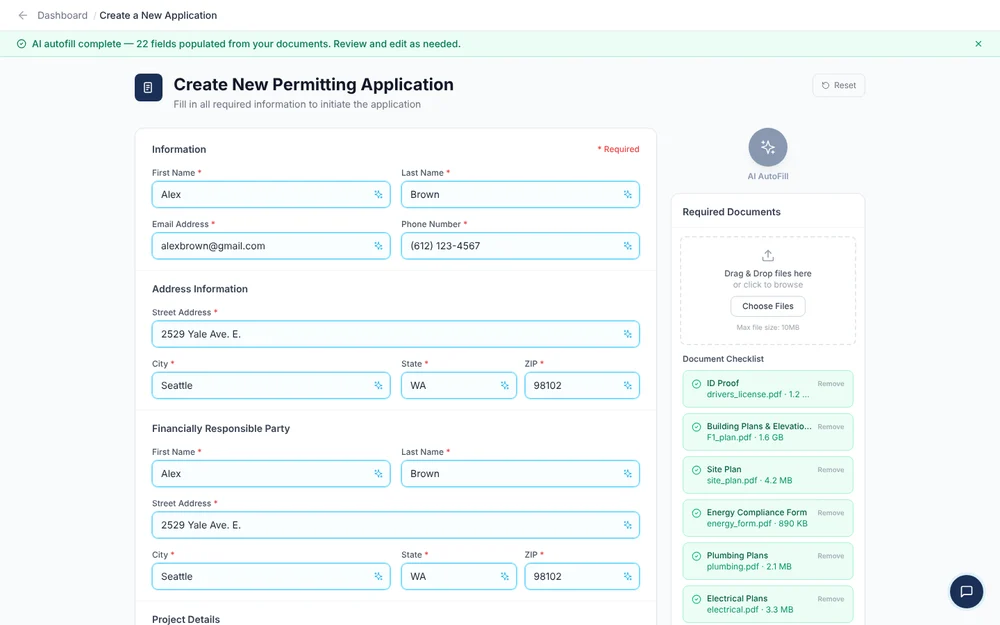
AI fills the form. The applicant decides.
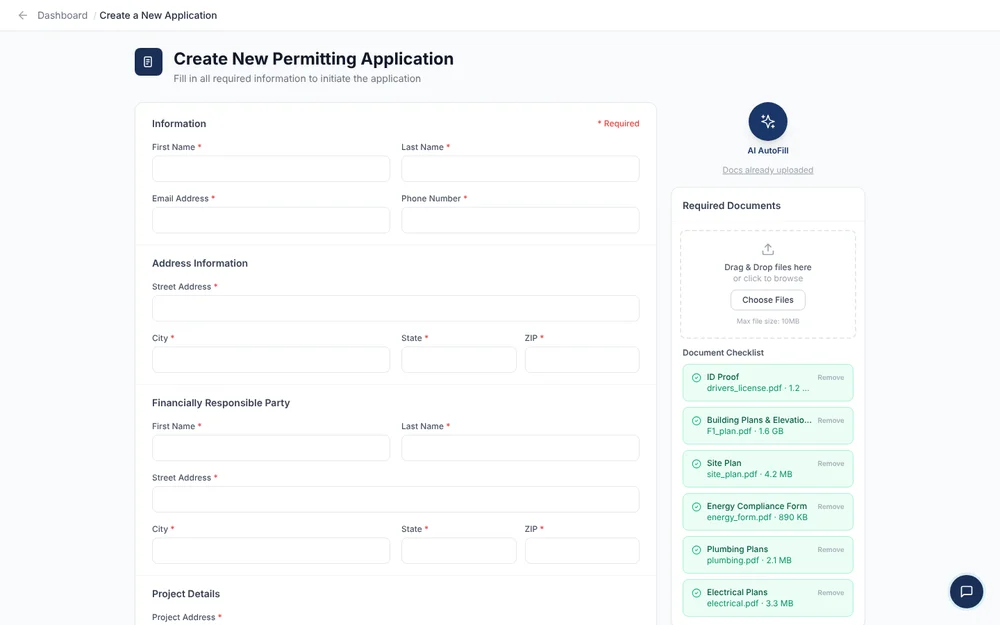
Principle: AI fills, people decide. Upload the files once, fill the form in one click, then check and edit.
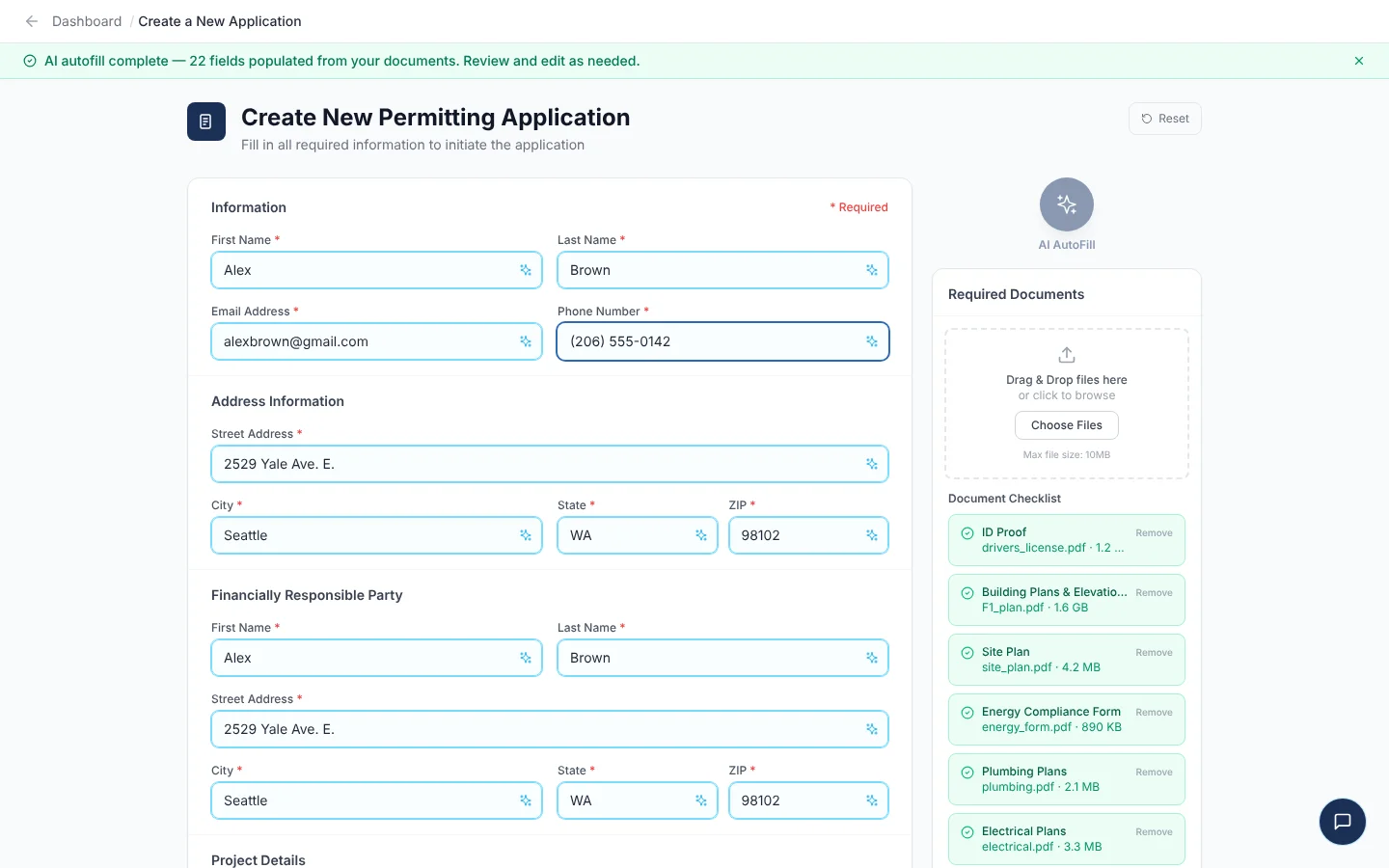
- Upload the documents Drawings, site plan and license already hold most answers.
- One click to fill AI reads the files and fills the form.
- A summary of what changed 22 fields filled from the uploaded files.
- Every AI field is marked The icon stays until the applicant changes it.
- Still editable The applicant corrects anything AI got wrong.
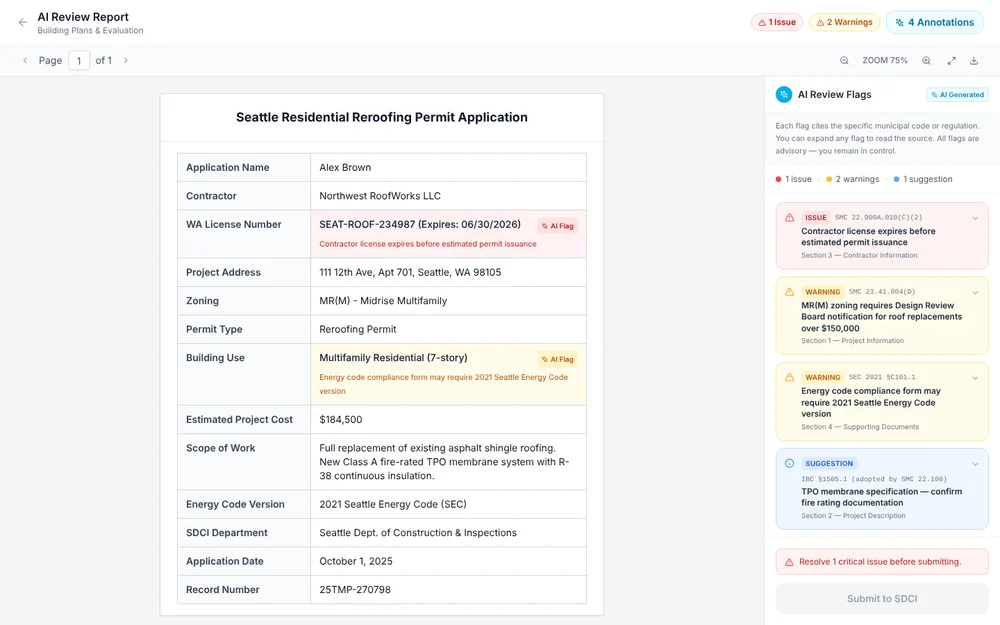
A review that cites the code
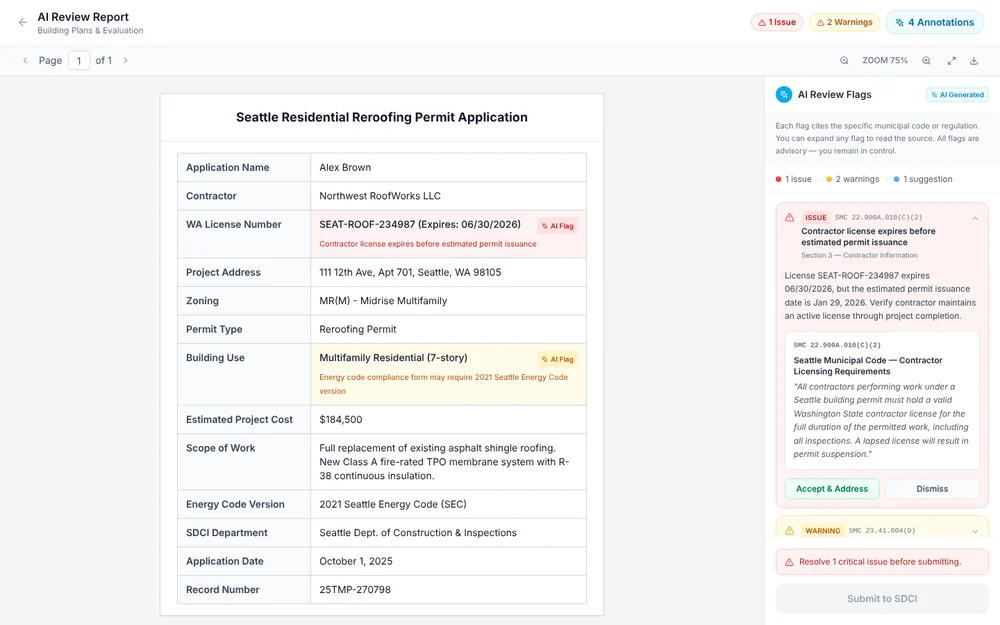
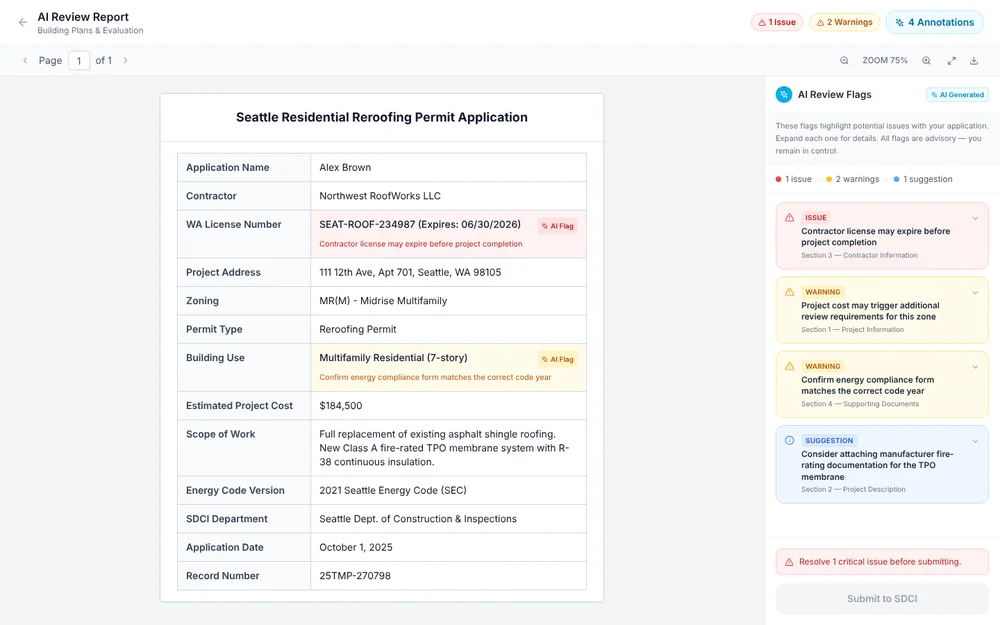
Principle: cite the rule. Issues are flagged before submitting, each with the municipal code behind it.
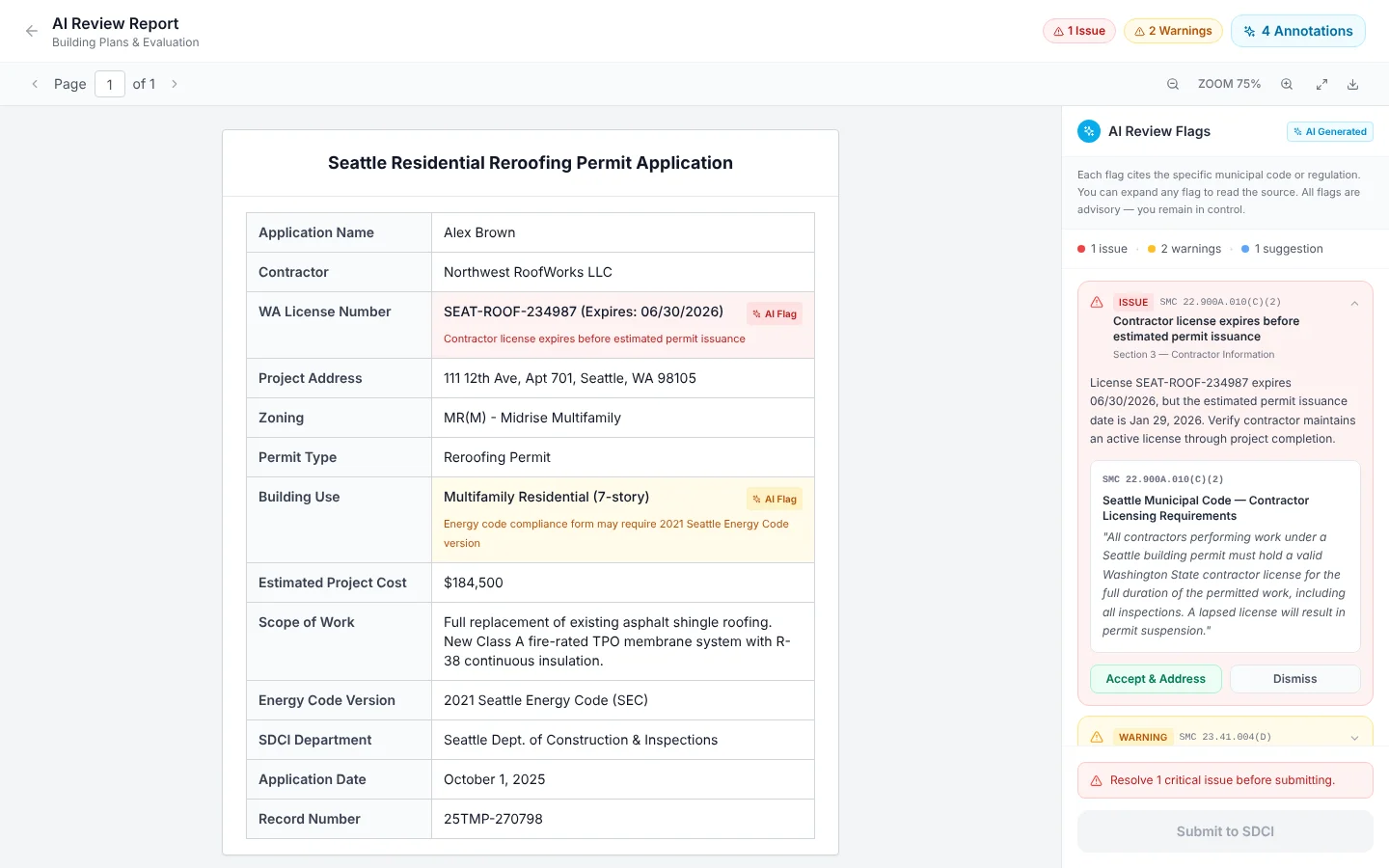
- Issues, before submitting Ranked as issue, warning or suggestion.
- Flagged in place The flag sits on the exact field it’s about.
- The rule behind it Each flag cites the municipal code and quotes the source.
- The applicant decides Accept or dismiss. Flags are advisory.
- Blocks only what’s critical Submitting waits until the critical issue is resolved.
Study
Do the three touchpoints need full AI, or is less enough?
We expected more AI to help, and also to bring new usability problems. To test it, we built three versions. Each runs the same three steps. Only the level of AI changes.
| V1No AI | V2Partial AI | V3Full AI | |
|---|---|---|---|
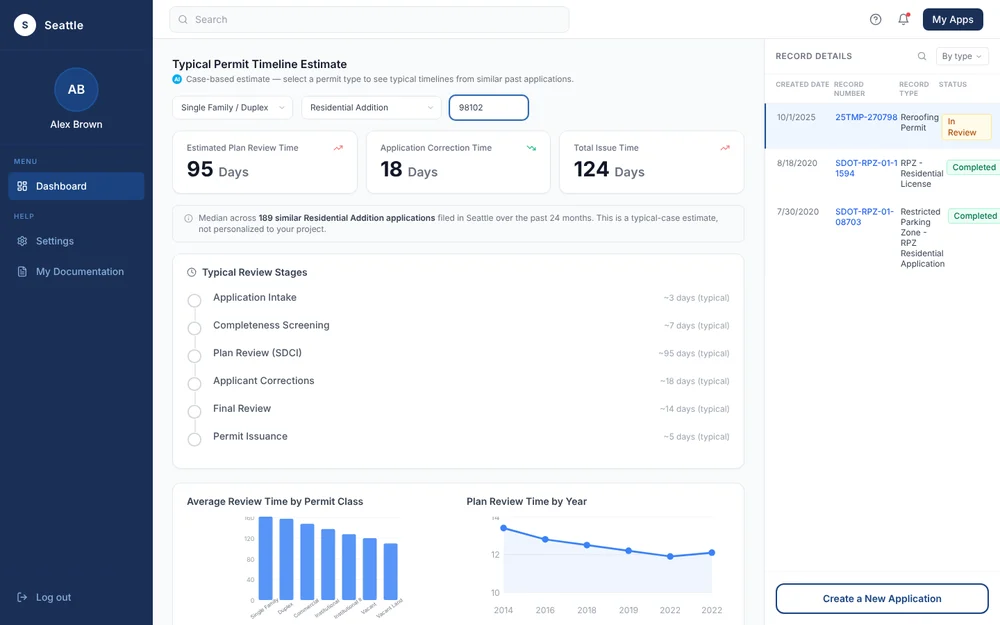
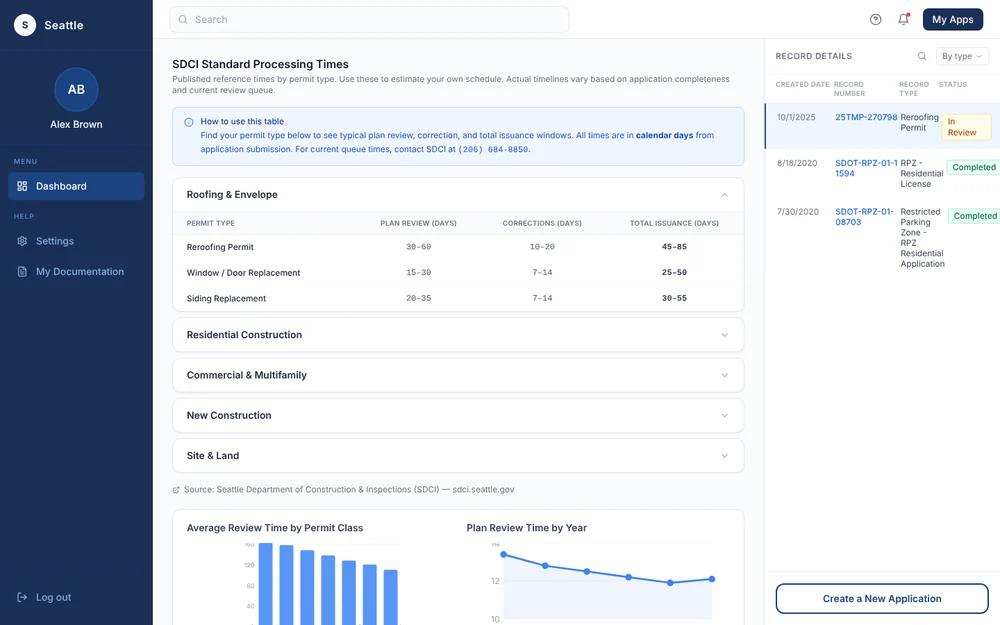
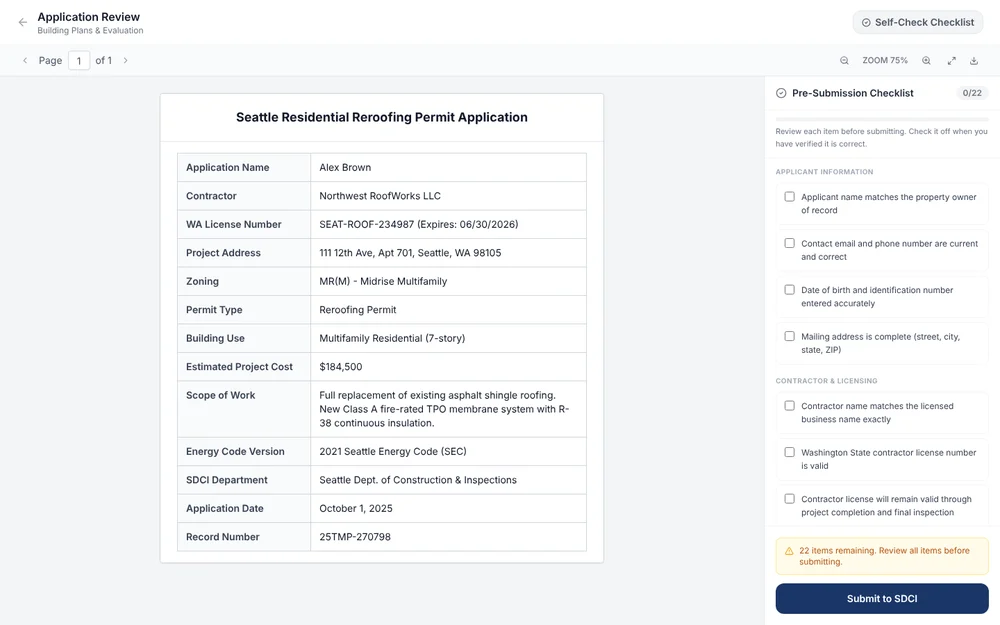
| Timeline | A standard table of processing times, looked up by hand. | An estimate from similar past permits, by permit type and ZIP code. | A personal estimate by review stage, built from the applicant’s own record, with its basis one click away. |
| Form | A blank form, typed by hand. | A chatbot answers questions while the applicant types. | AI fills the form from the uploaded files. Every filled field is marked and editable. |
| Review | A self-check checklist before submitting. | AI flags issues in the application. | AI flags issues and cites the municipal code behind each one, with the source text on expand. |
- 4212 architects + 30 residents
- 14per version, one version each
- 78%use AI regularly or heavily
- Consent and intro
- Task 1: Timeline
- Task 2: Form
- Task 3: Review
- 15-question survey9 Likert, 5 multi-select, 1 open
2 items
Usability
The help made it clear what to do. The form took little time and effort.
3 items
Trust
Confidence completing the task, in the accuracy of the information and in smooth corrections later.
4 items
Performance expectations
Confidence in the timeline, understanding the issues, fixing errors and smooth corrections.
Results
AI helped. More AI didn’t help more.
Usability
F(2, 39) = 10.73, p < .001, η² = .35
Trust
F(2, 39) = 26.03, p < .001, η² = .57
Performance expectations
F(2, 39) = 21.94, p < .001, η² = .53
Table view
| Measure | Version | Mean | 95% CI |
|---|---|---|---|
| Usability | V1 No AI | 2.71 | 2.34–3.09 |
| Usability | V2 Partial AI | 3.64 | 3.27–4.02 |
| Usability | V3 Full AI | 3.86 | 3.48–4.23 |
| Trust | V1 No AI | 2.67 | 2.39–2.94 |
| Trust | V2 Partial AI | 3.71 | 3.44–3.99 |
| Trust | V3 Full AI | 3.98 | 3.70–4.25 |
| Performance expectations | V1 No AI | 2.21 | 1.89–2.54 |
| Performance expectations | V2 Partial AI | 3.32 | 2.99–3.65 |
| Performance expectations | V3 Full AI | 3.66 | 3.33–3.99 |
Both AI versions beat the baseline on all three measures, with large effects. Full AI scored a little higher than partial AI on each one. None of those gaps were significant.
Residents
Mostly positive, most of all when they knew little about permits. Some drew a line at personal data.
“AI assistance is very helpful for the whole process, especially when i have no prior knowledge in this application.”
“For me AI is for exploring info, NOT to manage my personal private information”
“It provides me with some information. But still I would move forward based on lots of guesses.”
Architects
Mixed. Some wanted AI and their independence. Some ran into glitches on the review page.
“I prefer with AI but also keep independence”
Outcome
The version we designed first wasn’t the one to build.
We designed the full-AI version first. Partial AI at the same three steps got most of the gain. Personalization and cited sources add build cost for no significant gain. If the City builds one, partial AI is the level to start with.
Takeaways
The right amount of AI wasn’t the most AI
Going in, more AI looked like the obvious answer. The data showed partial AI captured most of the gain. Now I test how much help a step needs before adding more.
Residents and architects need different levels of AI
Residents wanted AI to walk them through each step. Architects wanted help and wanted to keep control. One AI level won’t fit both. A next version could let each applicant choose how much the AI does.
What this study can’t tell us
Each version had only 4 architects, and we couldn’t recruit City permit reviewers. Partial and full AI were also hard to tell apart for some participants. A next round would use real applications and measure time and errors.