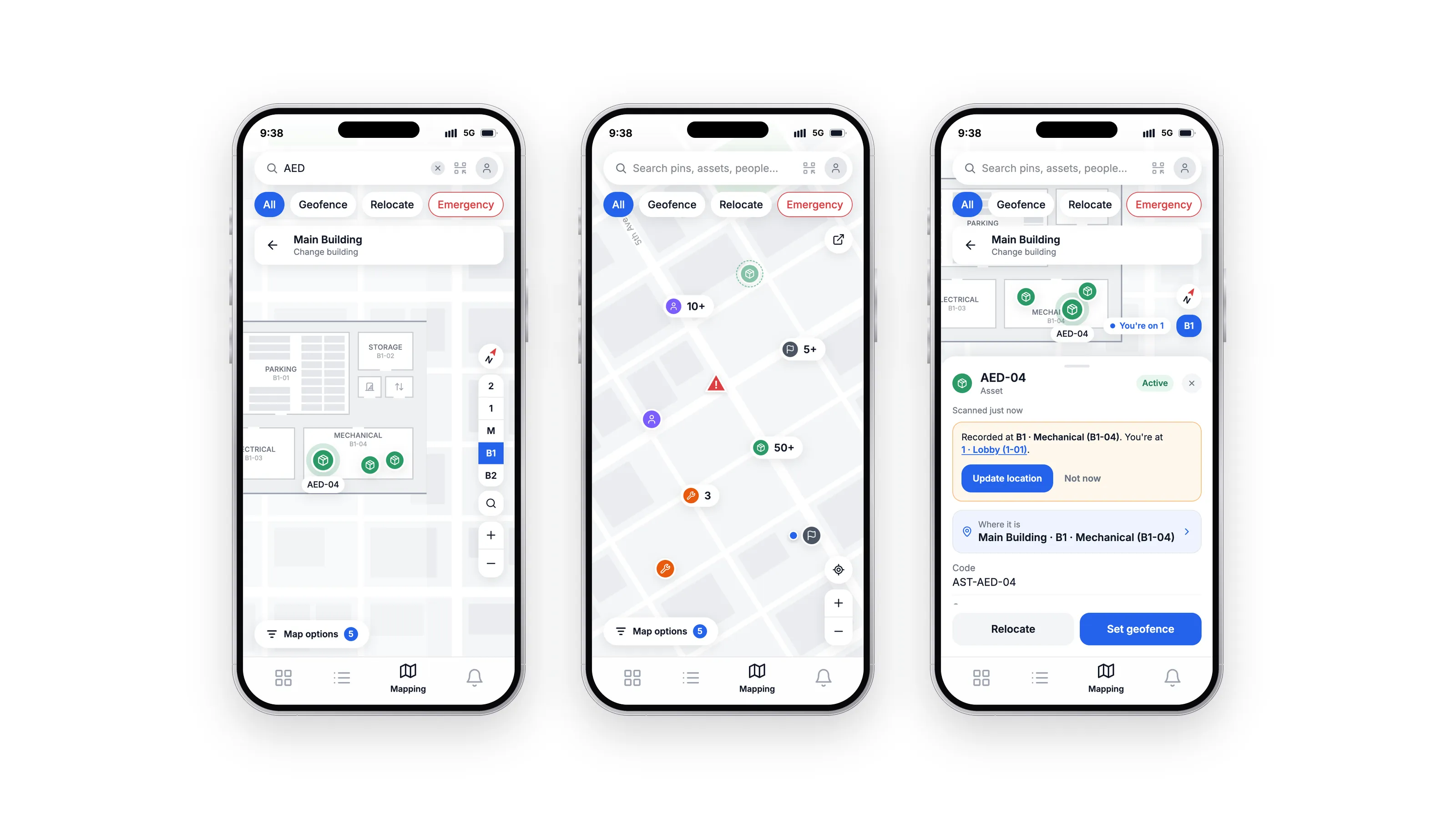
IDEA Enterprises AI Wiki Redesign
Redesigning an AI wiki for every technician and future automation
Overview
Guardian is IDEA’s AI-powered facilities-management platform. Its newest feature, the AI Wiki, is where technicians store step-by-step procedures. In a later phase, an AI agent will use them to answer work-order help requests. The engineering prototype assumed everyone writes like an engineer, while many technicians, reviewers and requesters spend little time at a computer. The team needed anyone, whatever their computer skills, to upload a guide and share what they know. As the sole designer, I audited four core flows, found 15 UX gaps, and redesigned each flow around that need. 10 of the 15 fixes have shipped, 6 in full and 4 in part.
- 4 flows audited
- 15 gaps found
- 10 fixes shipped
- Role
- Product Designer (Sole designer)
- Timeline
- Aug 2026 – Sep 2026
- Team
- 1 CEO & PM
- 1 Engineer
- Skills
- Product design
- Concept development
- Interactive prototyping
- Front-end development
- Tools
- Figma (Figma Make)
- Cursor
- Claude
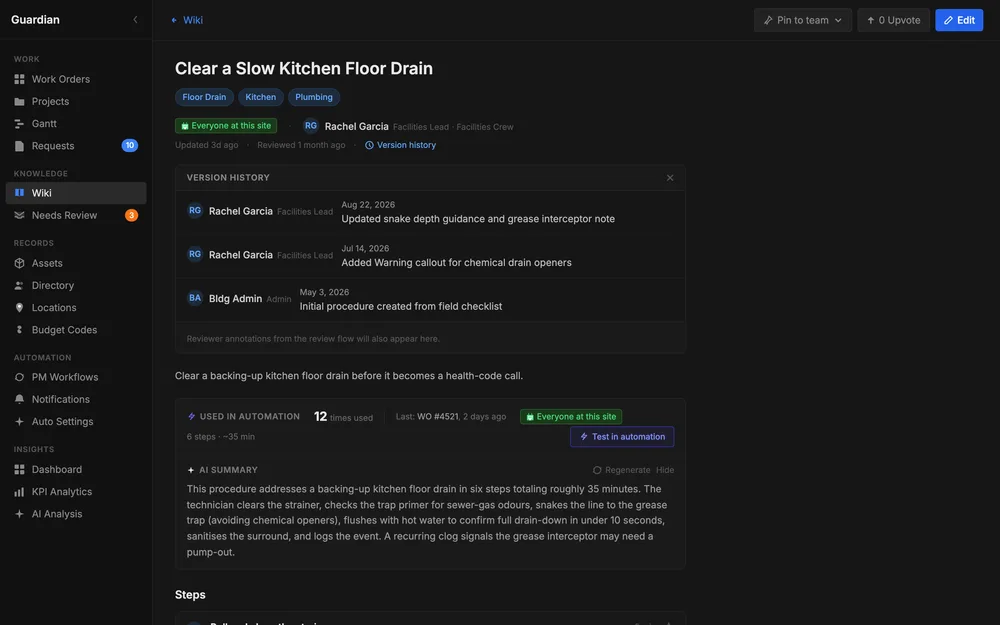
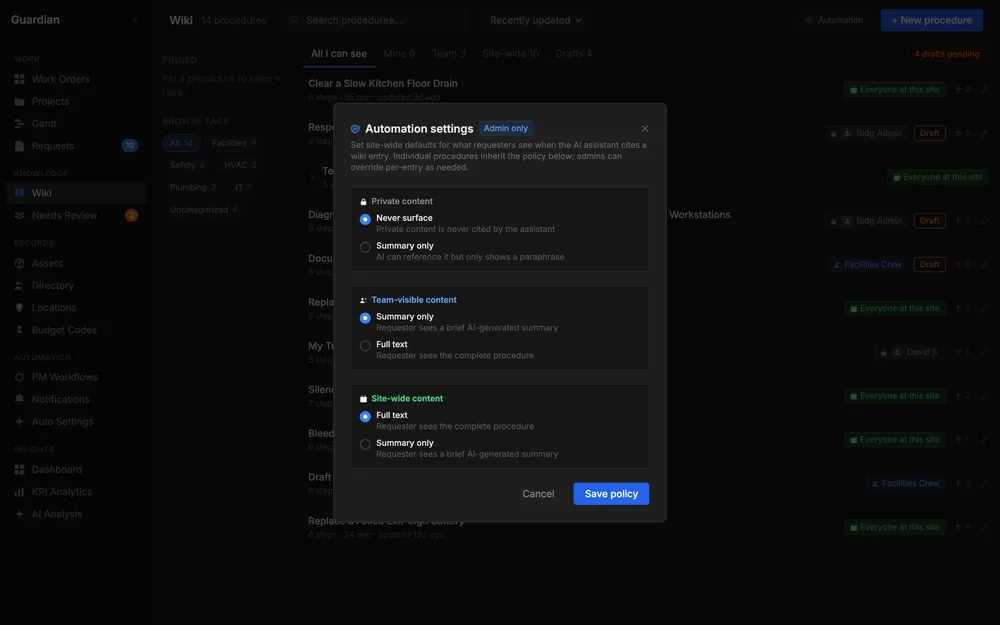
Problem
A request comes in
A smoke detector on the second floor keeps chirping.
The tech on shift is stuck
They haven't fixed one before, and nothing written down helps.
The know-how is elsewhere
The fix lives in a senior tech's head, or a PDF on a shared drive.
The AI can't use it yet
Untagged pages give an AI agent nothing to route on.
The core challenge was getting knowledge written in a shape both people and AI can use. In the previous design, most pages ended up unstructured, untraceable and uncategorized.
Users
Everyone in this chain uses the wiki: the technician who writes a procedure, the lead who reviews it, the admin who decides who sees it, the requester who needs help. Many of them have a GED-level education and spend most of their day on site, not at a computer.
That was the barrier this project set out to remove. If any step feels like paperwork, knowledge stops moving, and in phase 2 the AI agent has nothing reliable to answer from.
Writes · Reads
Technician
Knows the fix by heart. Needs to get a procedure down in plain words, and follow one mid-job without hunting for the warning.
Approves
Reviewer
A lead who checks drafts between other work. Needs to see what changed at a glance, and say why without writing an essay.
Sets rules
Admin
Decides who can see each page, and how much of it the AI may show. Needs the choice spelled out in plain words, not settings jargon.
Asks for help
Requester
Files a work-order help request. May never open the wiki; needs an answer short and clear enough to act on.
Answers from the wiki
AI agent
Answers requests with what people wrote. It can’t fix a vague or untagged page, so the writing tools add that structure quietly, without asking more of the people writing.
Audit
I audited the prototype the way its users would meet it: four flows, each walked as the person who does that job. On every screen I logged what got in the way, which line of the brief it missed, and a direction for the fix. The audit turned up 15 gaps.
Method
Walk each flow as its user.
Find and Use as a technician, Contribute as an author, Govern as a reviewer.
Annotate in place.
Each gap is pinned to the screen in Figma, with what breaks and the part of the brief it misses.
Group by root cause.
The 15 gaps fell into three patterns: unstructured, untraceable and uncategorized.
CEO & PM brief
Get first-time users productive fast, and let anyone upload a guide.
Prototype data
18 pages, 3 categorized. 4 copies of one title.
Role walkthroughs
Each flow walked as a technician, reviewer, admin and requester.
Team reviews
Gaps reviewed with the CEO & PM and engineer to set priorities.
| 15 gaps | Find4 | Contribute5 | Use4 | Govern2 |
|---|---|---|---|---|
| UnstructuredHard to write, hard to follow4 | None |
|
| None |
| UntraceableCan't tell who, which version, or what changed7 |
| None |
|
|
| UncategorizedThe AI can't route it4 |
|
|
| None |
Here is where each gap sits in the prototype. Pins match the list beside each screen; every gap links to its fix.
4 flows · pick one to see its gaps
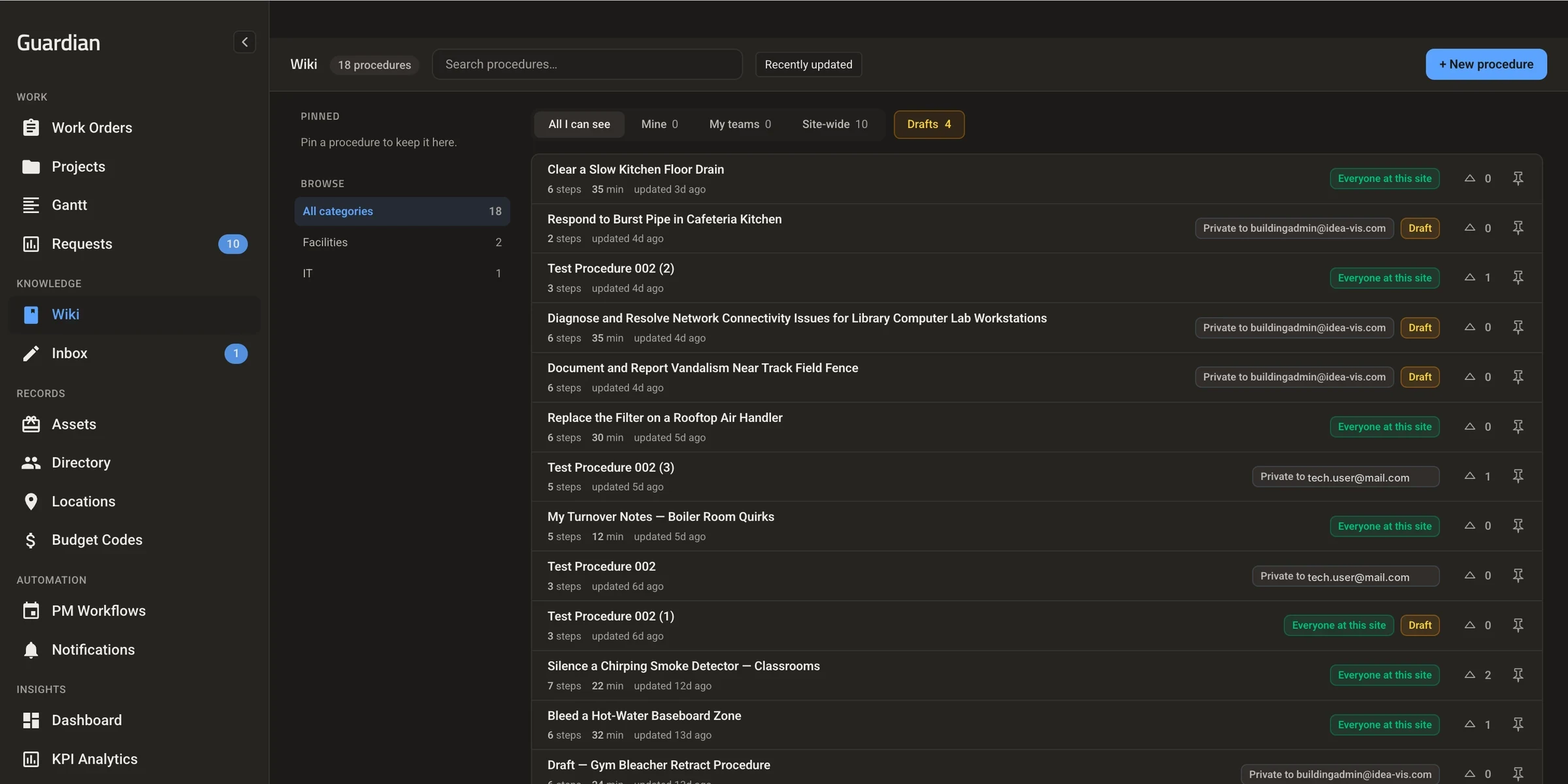
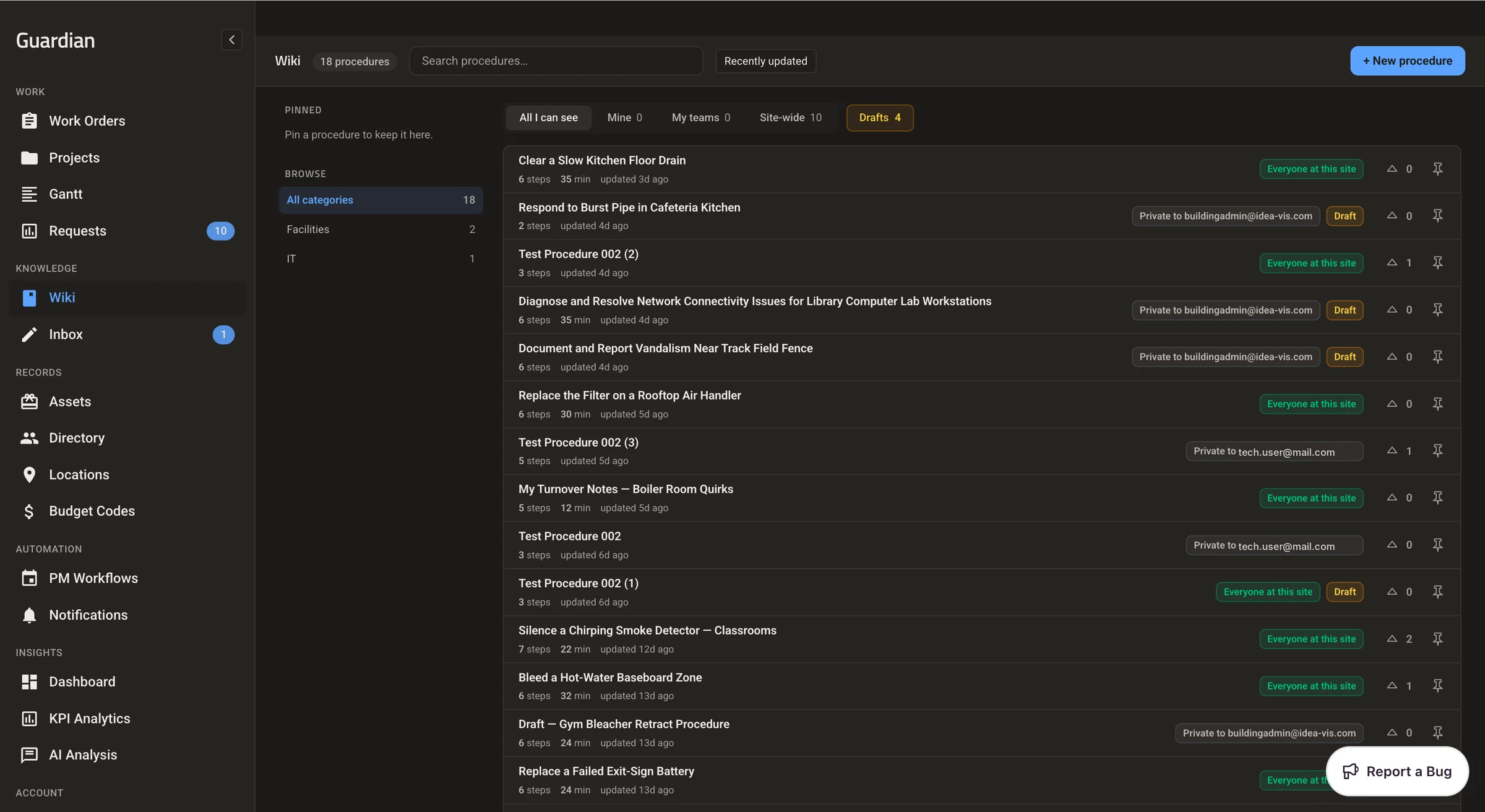
Duplicate titles
Four copies of "Test Procedure 002" sit in the list with nothing linking them or saying which is current.
See the fixMost pages uncategorized
A fixed category list that almost nobody fills in: 18 pages, 3 of them categorized.
See the fixVisibility shown as an email
"Private to buildingadmin@…" names an address, not who can actually see the page.
See the fixConflicting filter states
Two different "selected" styles. The orange Drafts tab looks active even when it isn't.
See the fix- F1Untraceable
Duplicate titles
Four copies of "Test Procedure 002" sit in the list with nothing linking them or saying which is current.
See the fix - F2Uncategorized
Most pages uncategorized
A fixed category list that almost nobody fills in: 18 pages, 3 of them categorized.
See the fix - F3Untraceable
Visibility shown as an email
"Private to buildingadmin@…" names an address, not who can actually see the page.
See the fix - F4Untraceable
Conflicting filter states
Two different "selected" styles. The orange Drafts tab looks active even when it isn't.
See the fix
Markdown-only editor
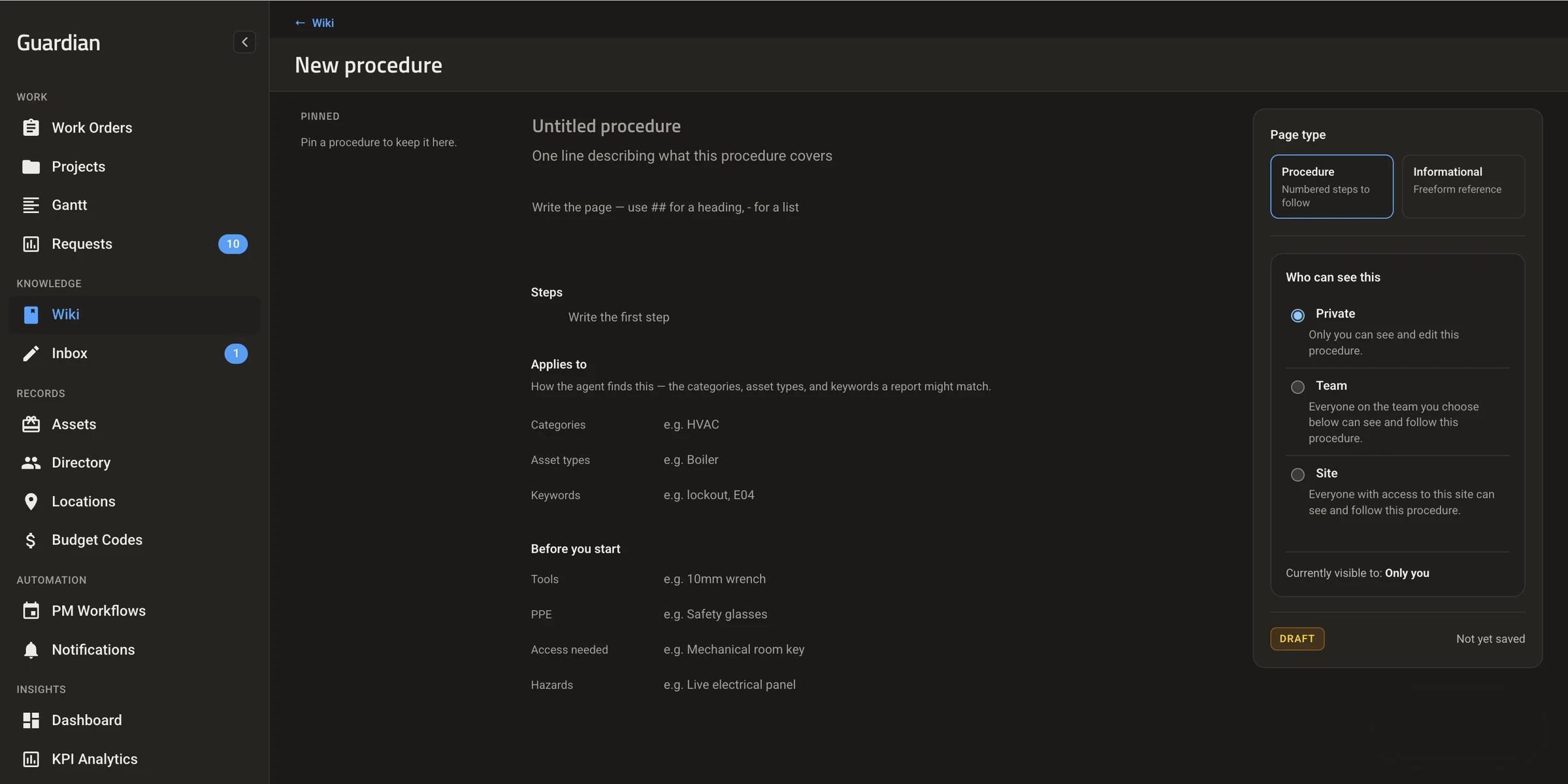
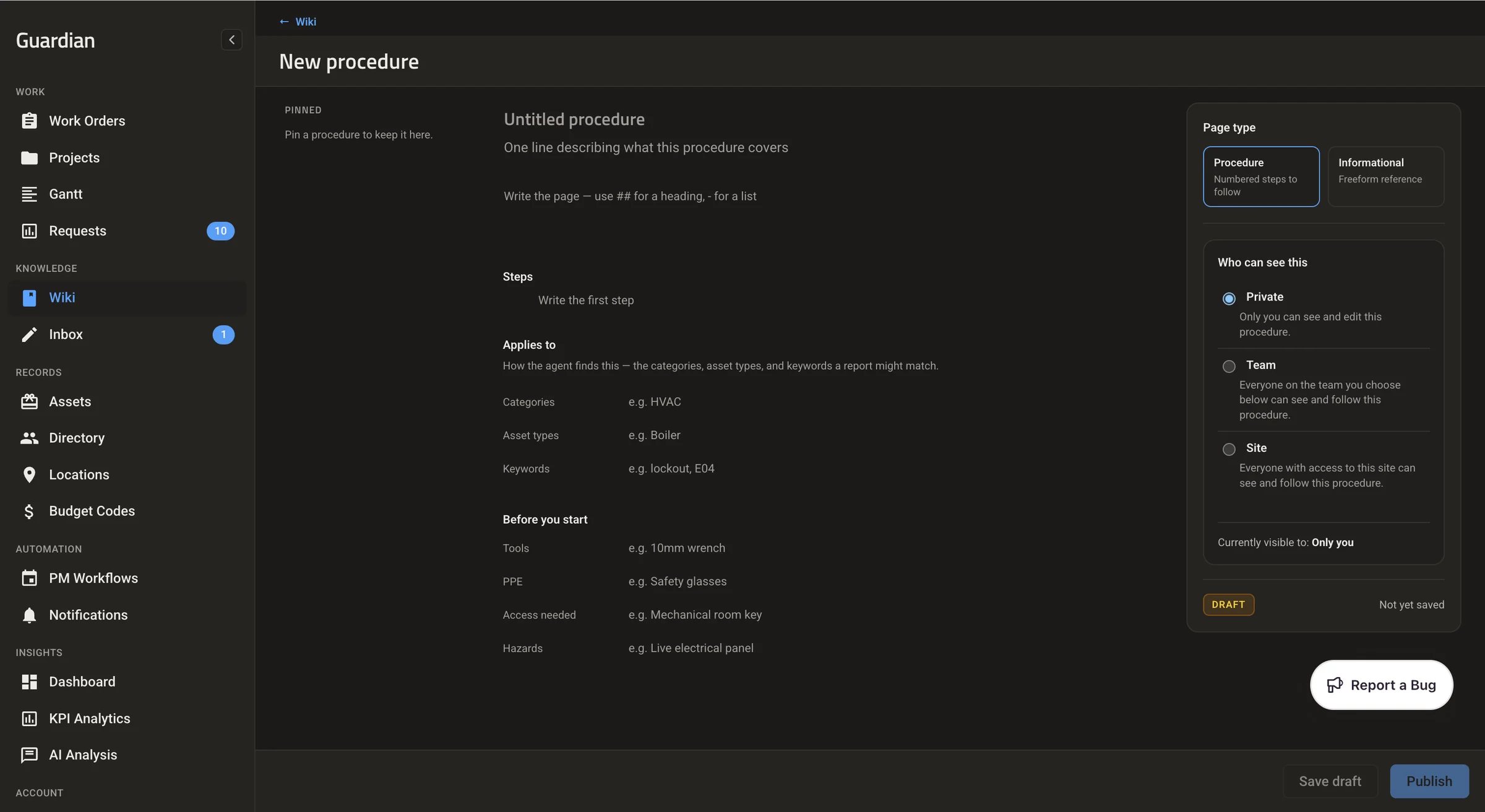
"Use ## for a heading" asks frontline staff to learn syntax before they can write.
See the fixNo way to import a document
Legacy procedures have to be retyped by hand. The brief asked for copy-paste and whole-document import.
See the fixRouting fields left blank
Categories, asset types and keywords are free text, so they stay empty and the agent has nothing to match on.
See the fixLayout and purpose mixed
Page type only covers layout. There's no way to say whether a page is a help guide or a policy.
See the fixStatus in the wrong place
"Draft · Not yet saved" sits inside the editable settings card, where it reads like an option.
See the fix- C1Unstructured
Markdown-only editor
"Use ## for a heading" asks frontline staff to learn syntax before they can write.
See the fix - C2Unstructured
No way to import a document
Legacy procedures have to be retyped by hand. The brief asked for copy-paste and whole-document import.
See the fix - C3Uncategorized
Routing fields left blank
Categories, asset types and keywords are free text, so they stay empty and the agent has nothing to match on.
See the fix - C4Uncategorized
Layout and purpose mixed
Page type only covers layout. There's no way to say whether a page is a help guide or a policy.
See the fix - C5Unstructured
Status in the wrong place
"Draft · Not yet saved" sits inside the editable settings card, where it reads like an option.
See the fix
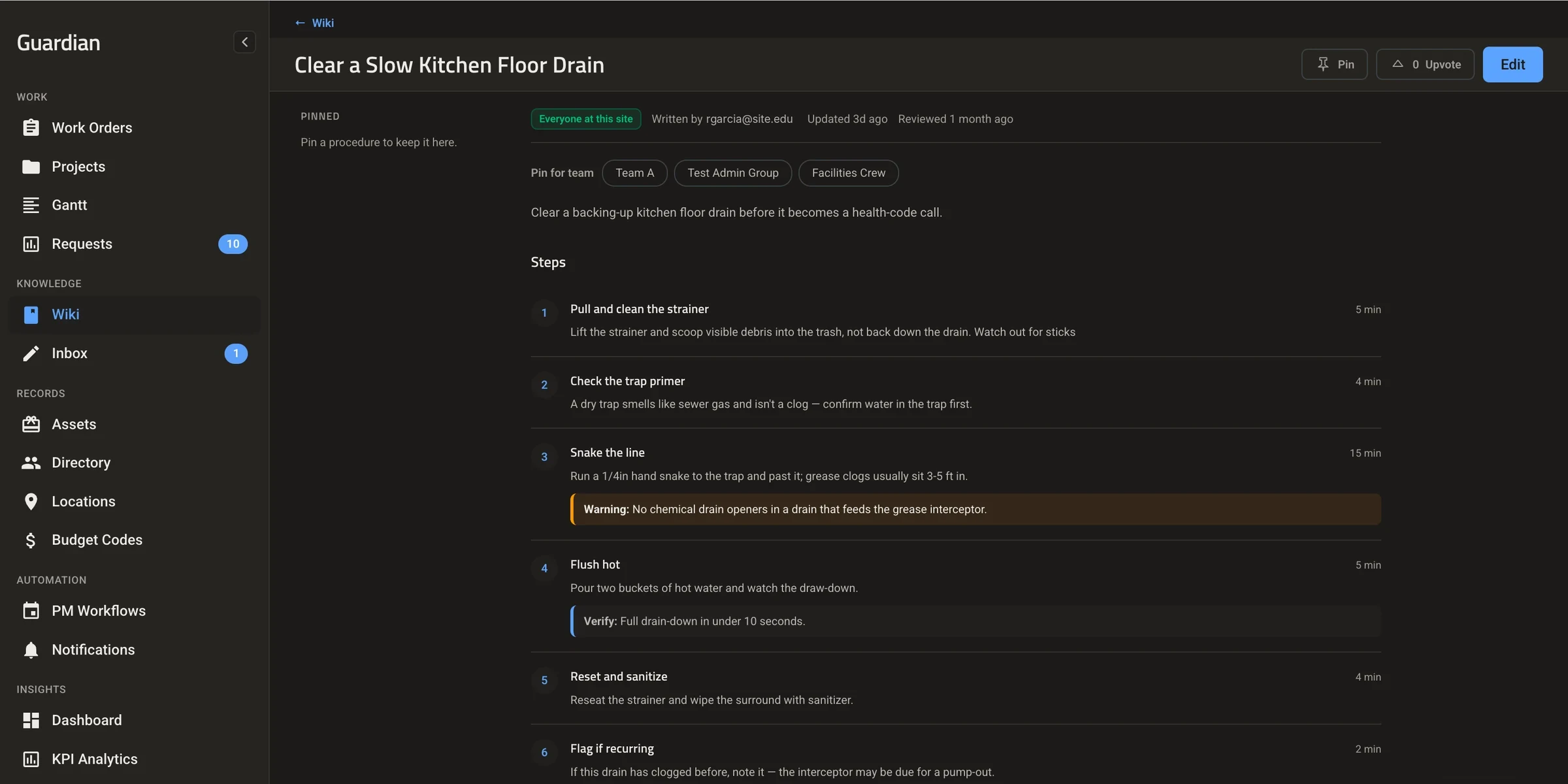
Author shown as a raw email
No name, role or team, so readers can't tell whose knowledge this is or who to ask.
See the fixPin means three things
Personal pin re-lists a title you already have open, team pin is a flat list of every team, and there's no way to flag a critical step.
See the fixNo sign the AI used it
Nothing shows whether the agent has ever answered a work order with this page.
See the fixNo version history
"Updated 3d ago" leads nowhere: no record of what changed or who changed it.
See the fix- U1Untraceable
Author shown as a raw email
No name, role or team, so readers can't tell whose knowledge this is or who to ask.
See the fix - U2Unstructured
Pin means three things
Personal pin re-lists a title you already have open, team pin is a flat list of every team, and there's no way to flag a critical step.
See the fix - U3Uncategorized
No sign the AI used it
Nothing shows whether the agent has ever answered a work order with this page.
See the fix - U4Untraceable
No version history
"Updated 3d ago" leads nowhere: no record of what changed or who changed it.
See the fix
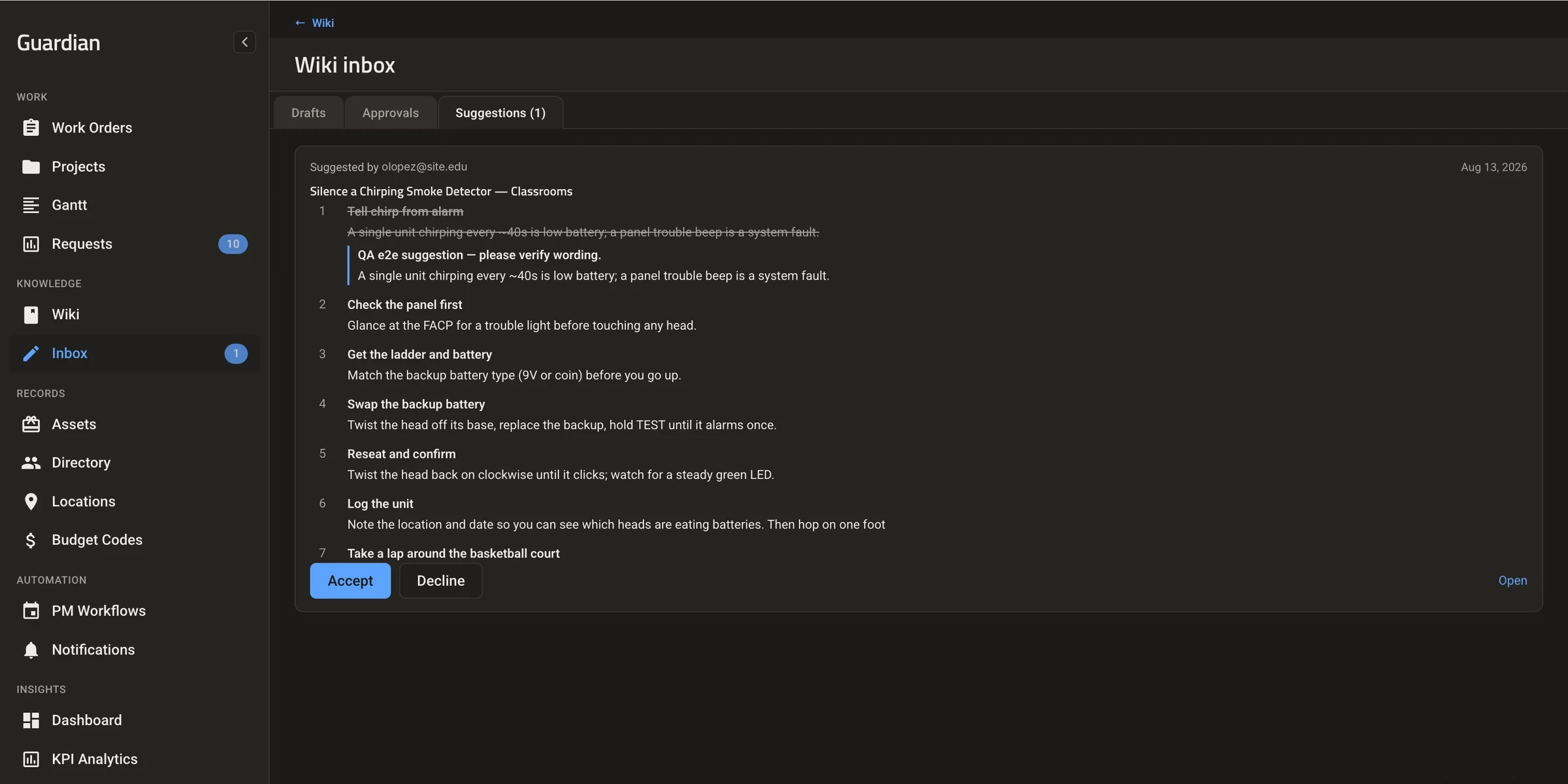
Review alerts buried
Wiki reviews land in the general Inbox, next to every other kind of notification.
See the fixAll-or-nothing review
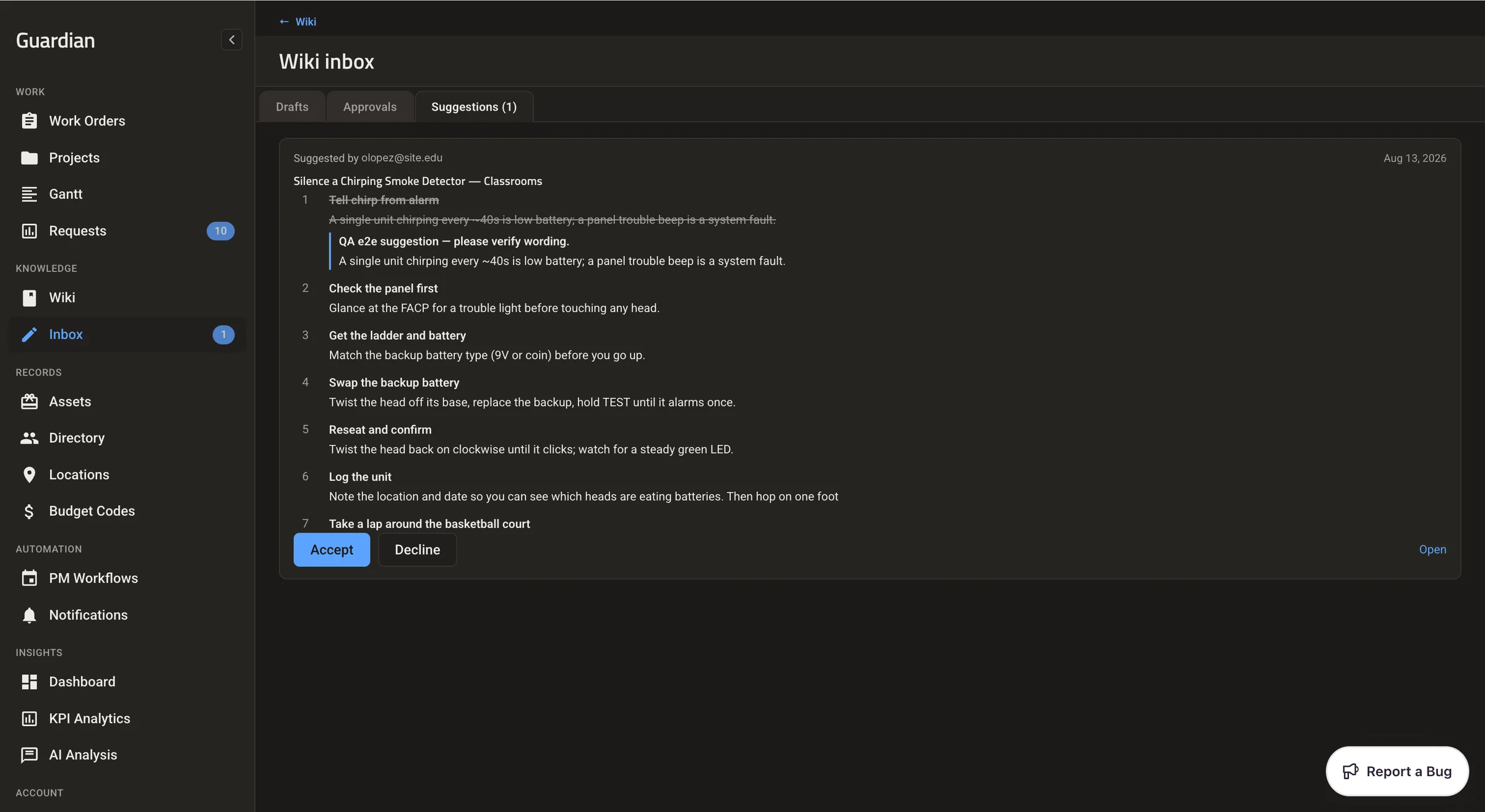
One Accept / Decline for the whole page, no inline comments, and only step 1 shows what changed.
See the fix- G1Untraceable
Review alerts buried
Wiki reviews land in the general Inbox, next to every other kind of notification.
See the fix - G2Untraceable
All-or-nothing review
One Accept / Decline for the whole page, no inline comments, and only step 1 shows what changed.
See the fix
Insights
The 15 gaps came from three causes.
Unstructured 4 gaps
People know the fix. The editor gave them nowhere to put it.
Shape first.
Steps, warnings and fields are there before anyone types.
Untraceable 7 gaps
You couldn’t tell who wrote a page, who could see it, or what had changed.
Owned at a glance.
Author, audience and history show on every page.
Uncategorized 4 gaps
Tags were optional, so nobody filled them in. The AI routes on tags.
AI suggests, people decide.
The tool proposes tags. People accept them with a click.
Information Architecture
The new structure gives each job its own place.
Before
- Wiki reviews sat in a general Inbox with every other notification.
- One flat list. Fixed categories, and duplicates side by side.
- A page was a Markdown box with optional fields.
After
- Reviews have their own home: Needs Review.
- The list groups versions and filters by who can see what.
- Every page has the same parts: steps, owner, audience, history.
Redesign
Each flow below opens with a side-by-side comparison and walks through its key decisions. Tags link back to the gaps they fix.
Flow 01
Find
Help technicians find the right procedure quickly and trust that it’s the latest version.
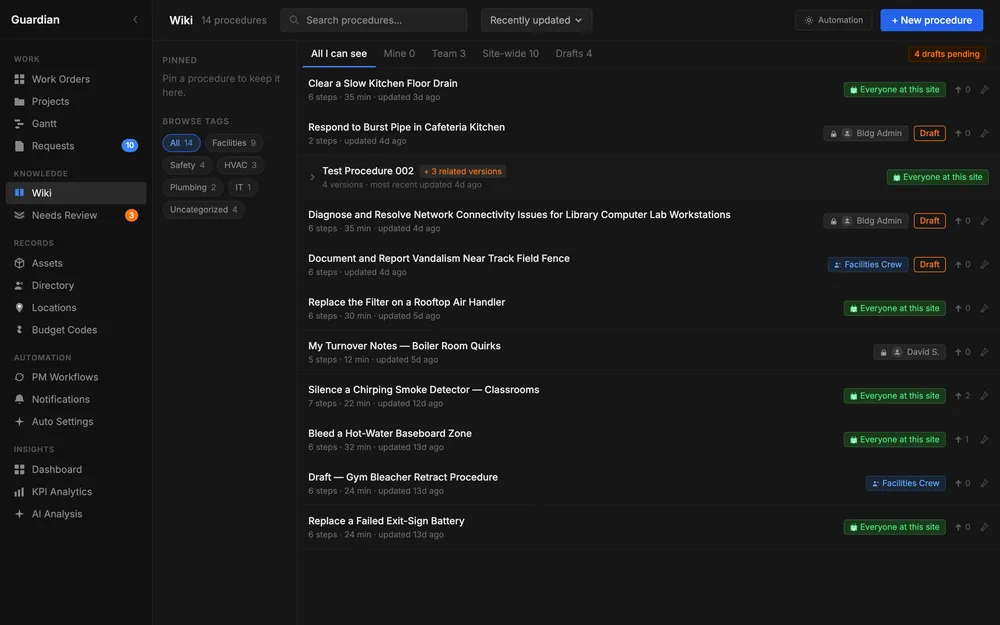
Consistent filter states
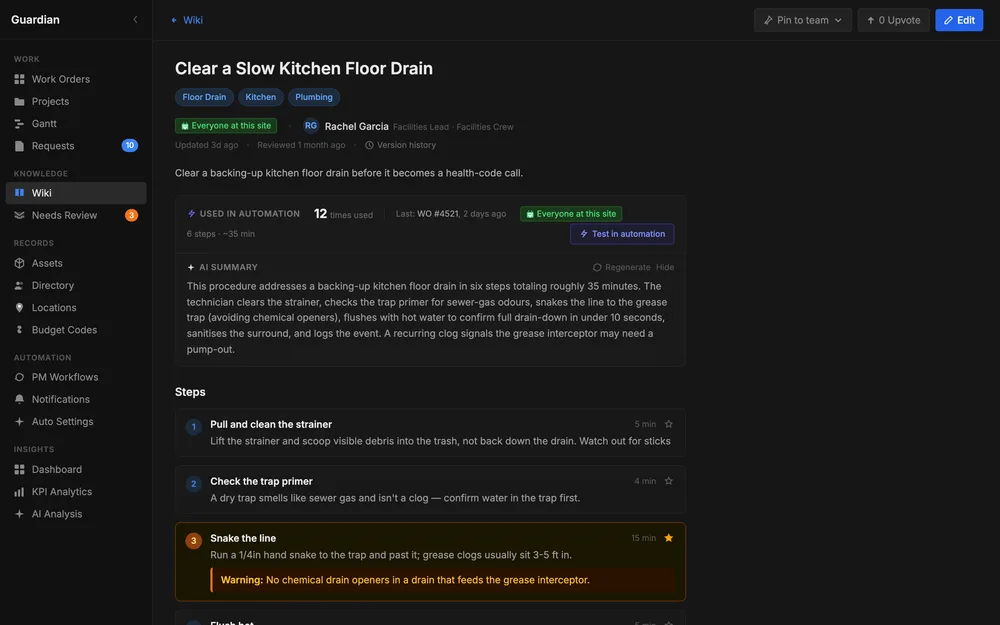
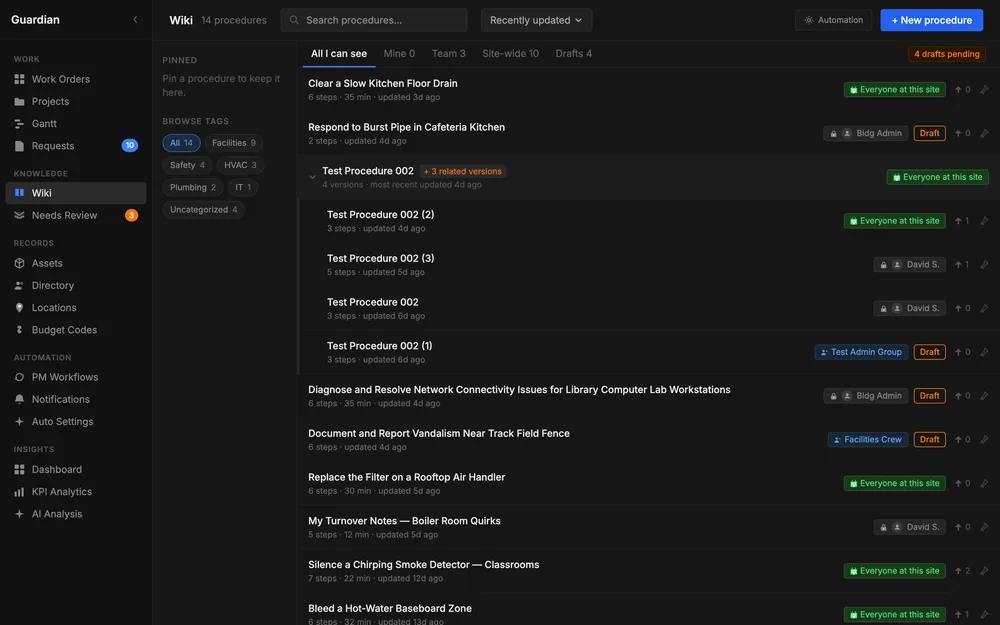
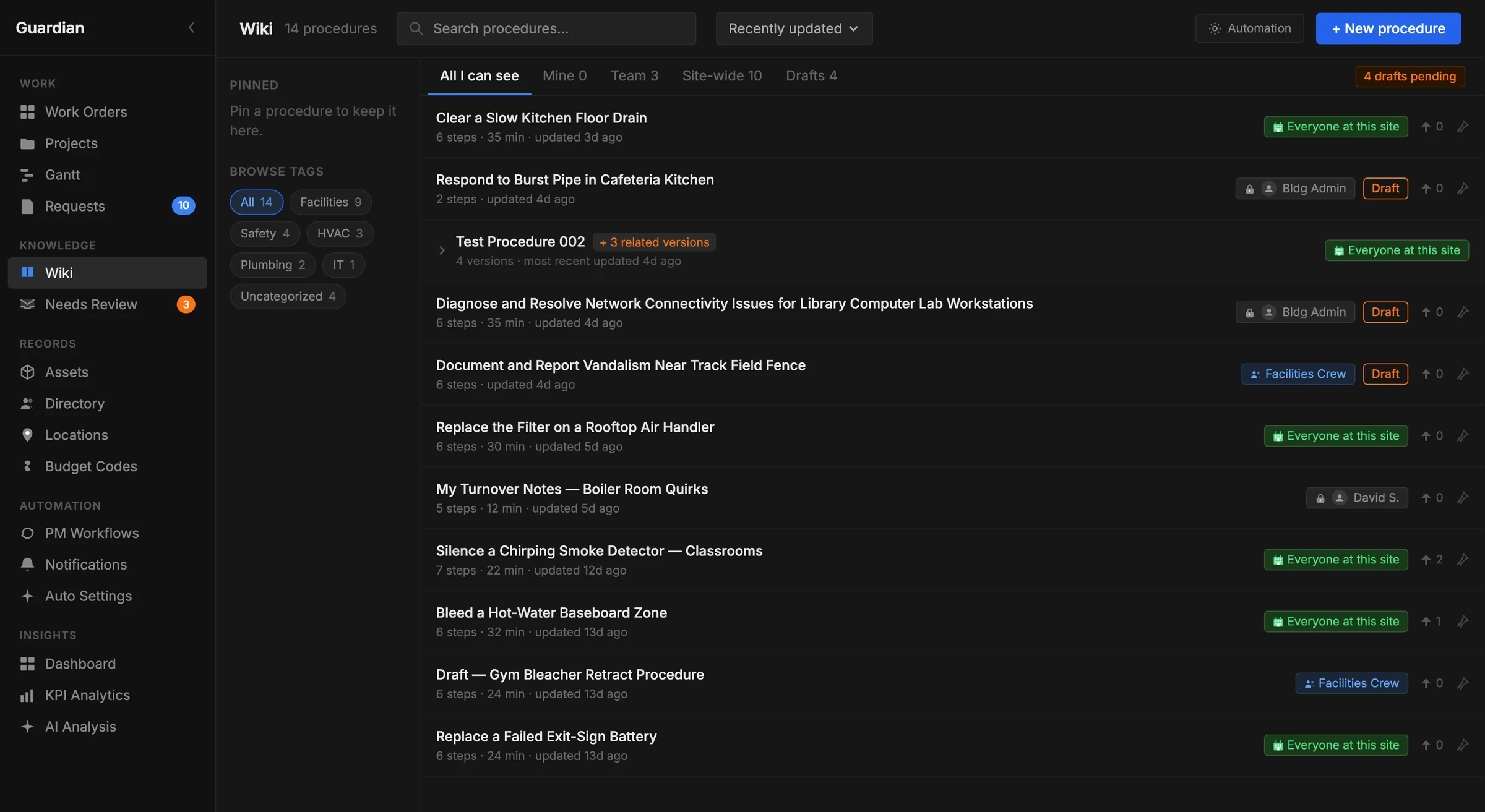
All tabs share one active style. Pending drafts have their own counter, which stays visible on every tab.
Owned at a glance · Fixes issue F1
Grouped versions
Duplicate procedures are grouped under one title. Users open a single row to see every version and which one is newest.
AI suggests, people decide · Fixes issue F2
Tags built from real content
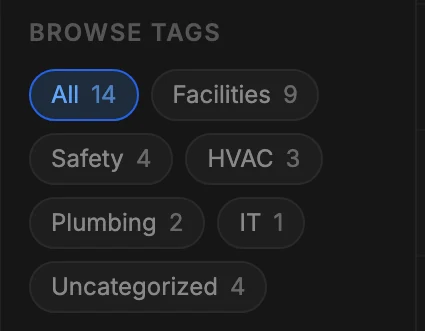
The tag list is generated from existing pages and shows a count for each tag. An Uncategorized filter makes untagged pages easy to spot.
Owned at a glance · Fixes issue F3
Readable visibility labels
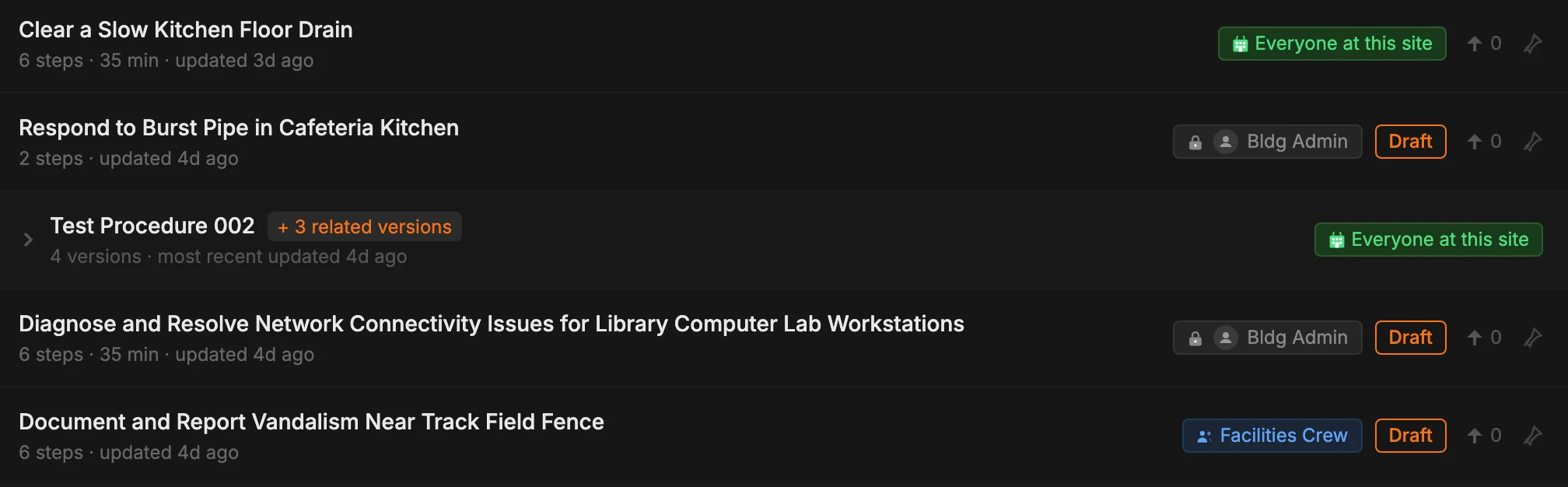
Each page shows who can see it through a simple icon system: a lock for private, a team name for team pages, a building for site-wide. A new Team tab sits next to Mine and Site-wide.
Flow 02
Contribute
Make it easy for anyone to write a procedure or bring in an existing document.
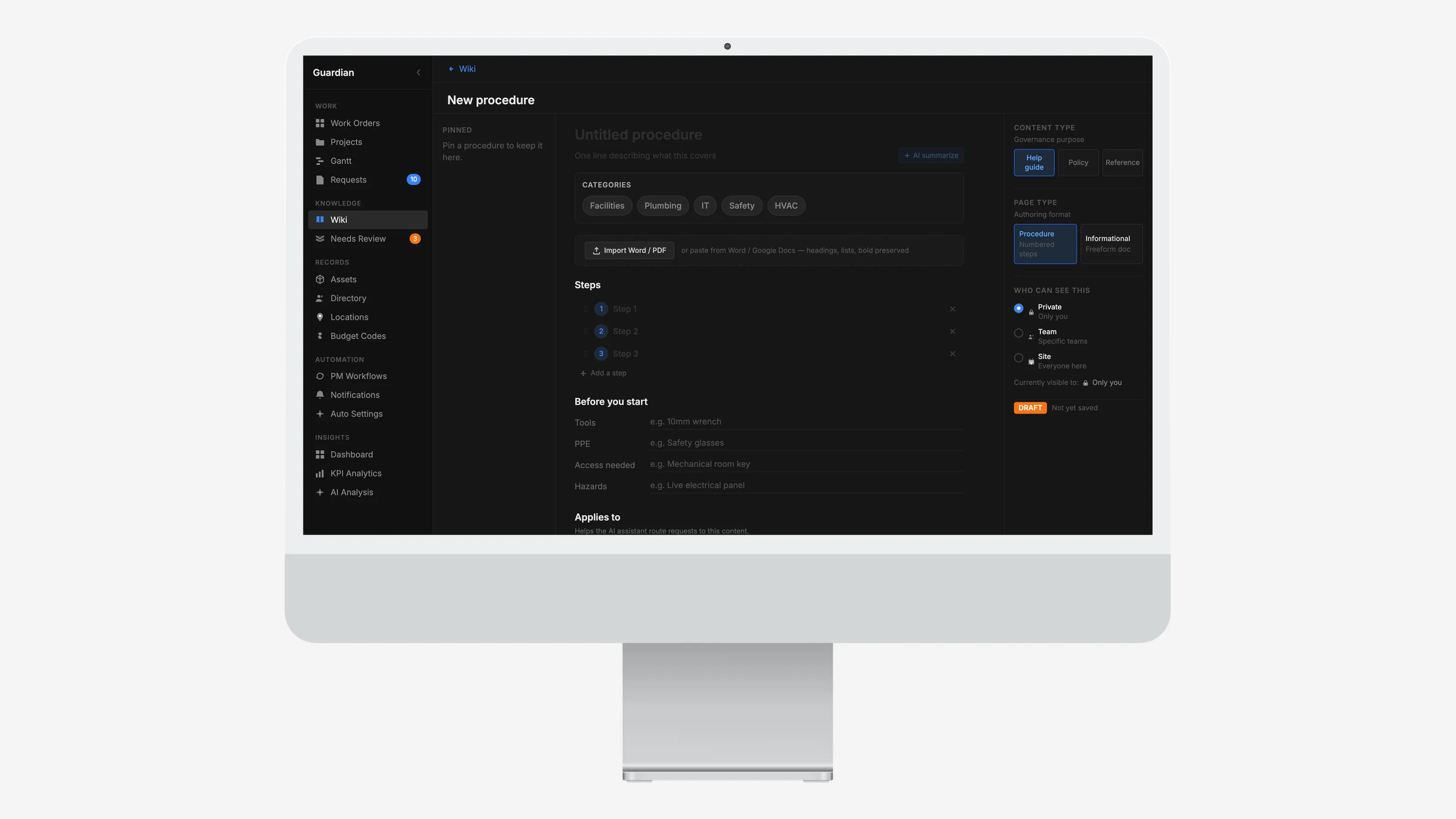
Guided step editor
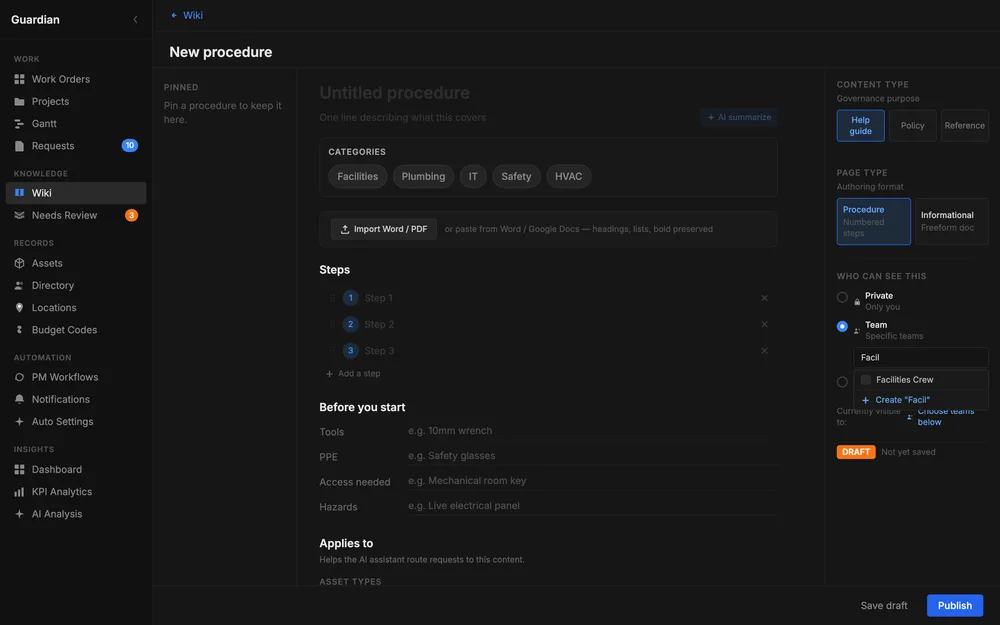
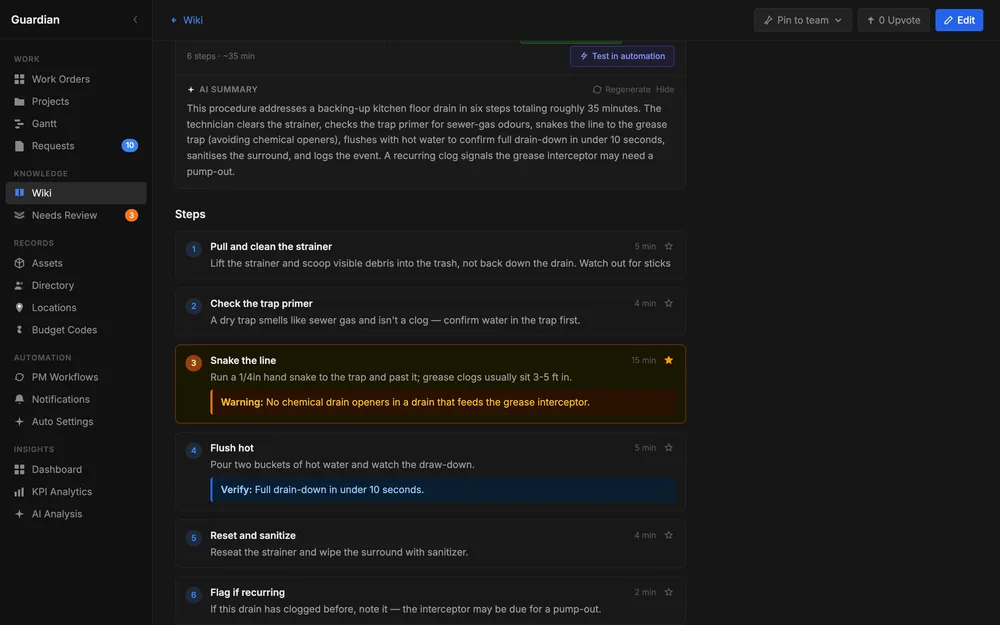
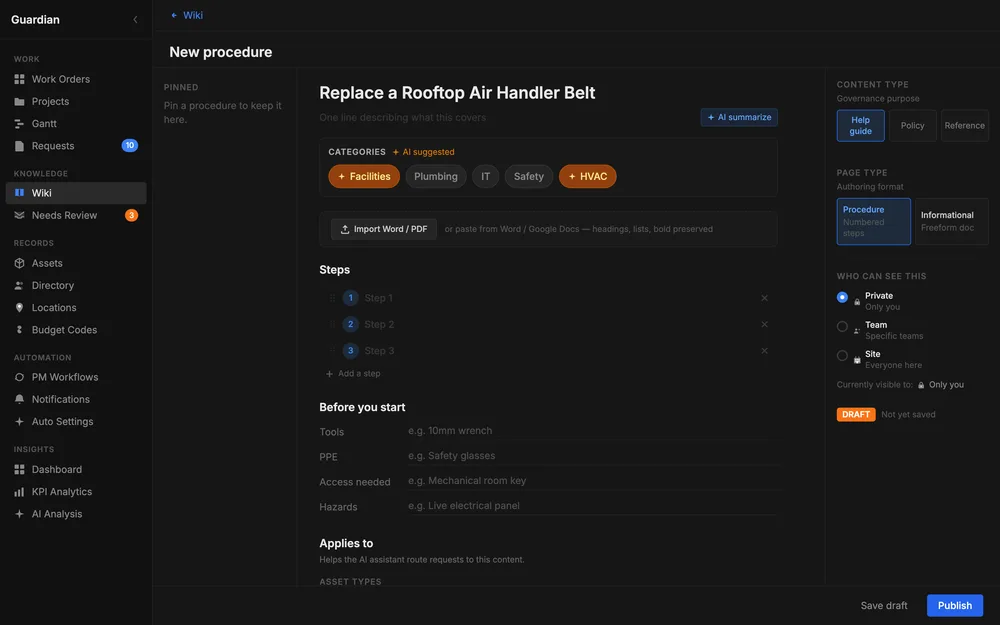
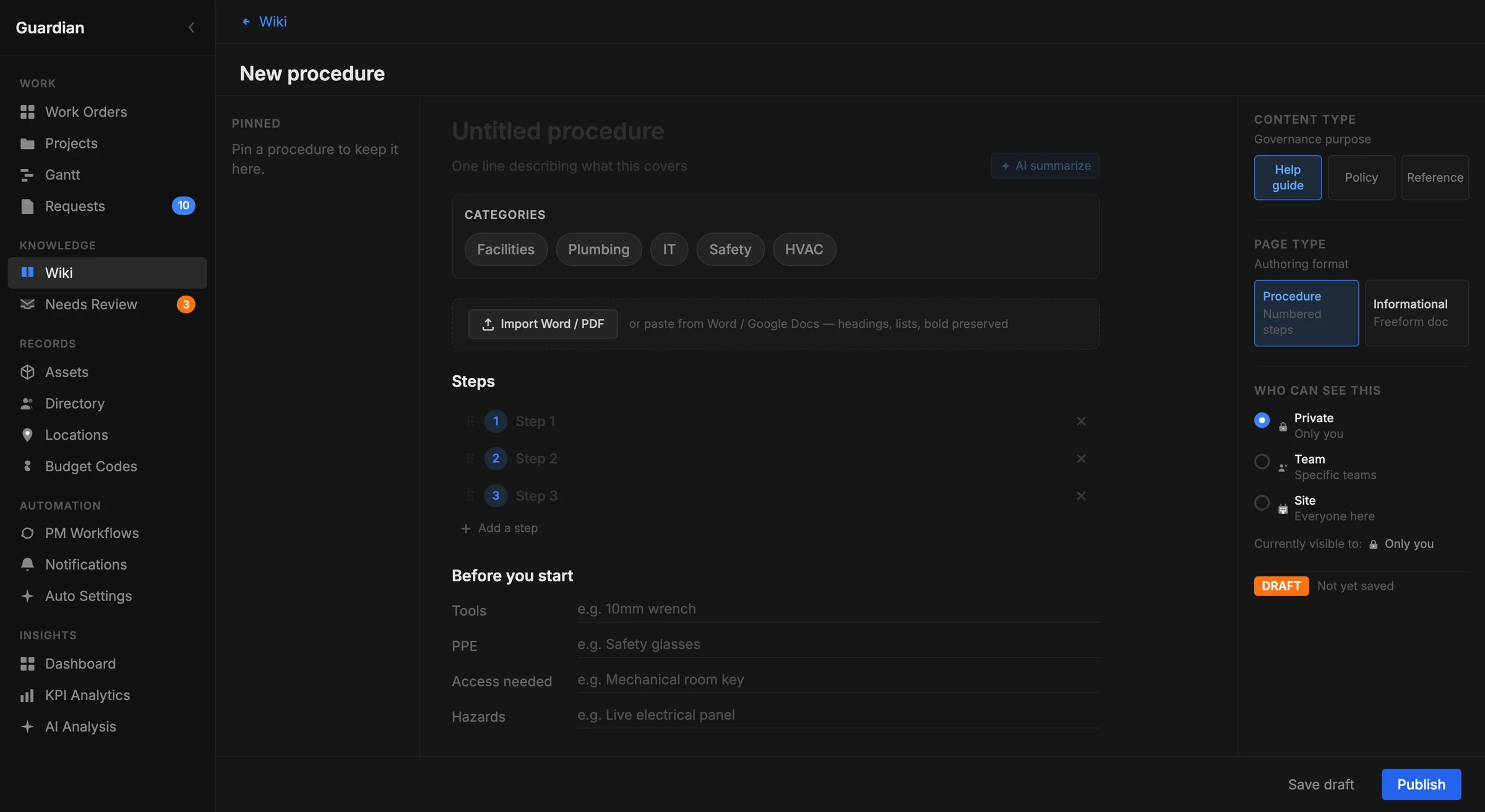
Authors fill in numbered steps, with optional Warning and Verify lines, plus a short “Before you start” list for tools, PPE and hazards.
Separate content type
Content type (Help guide, Policy, Reference) is its own choice, separate from page layout. Draft status now sits on its own, below the editable settings.
Shape first · Fixes issue C2
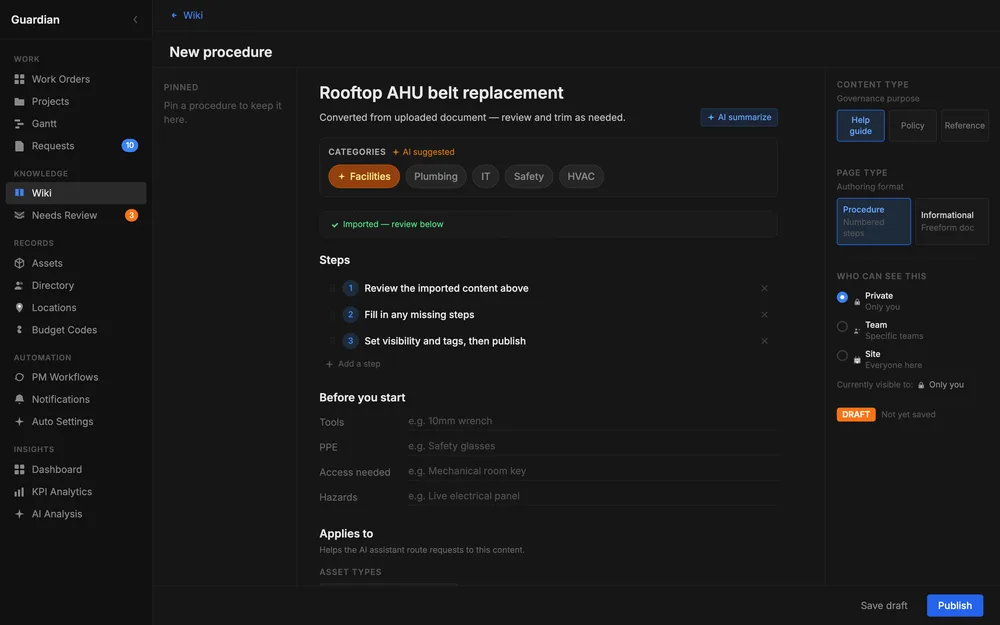
Document import
Authors upload a Word file or PDF, or paste from Google Docs. The content becomes a draft they can review and trim.
AI suggests, people decide · Fixes issue C3
AI-suggested categories
Matching categories are highlighted as the author types a title. One click keeps or removes each suggestion.
How should a page get its tags?
- AIn the prototype
Free-text fields
Type every tag by hand.
ResultFields left blank.
Trade-offEvery author spells tags differently.
- BIn the prototype
Fixed category list
Pick one from a set list.
Result3 of 18 pages categorized.
Trade-offThe list never covers every job.
- CChosen
AI suggests, author confirms
Tags come from the steps. One click accepts them.
ResultTags added in one click.
Trade-offDepends on good suggestions.
Owned at a glance · Prevents issue F1
Duplicate check on publish
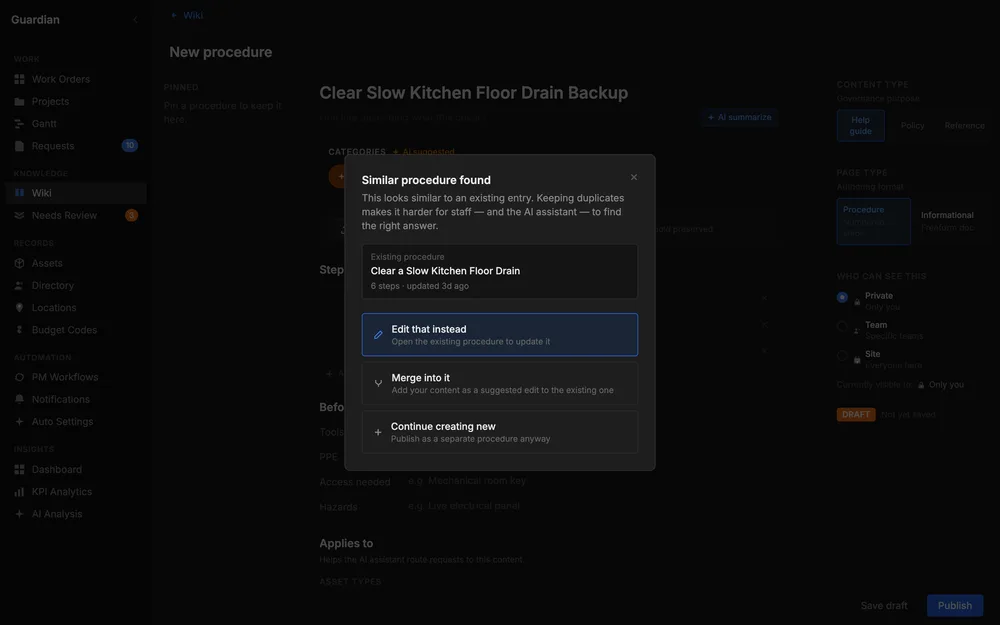
When a similar procedure already exists, the author can edit it, merge their changes into it as a suggestion, or publish a new page.
Flow 03
Use
Help technicians follow a procedure on the job and know who stands behind it.
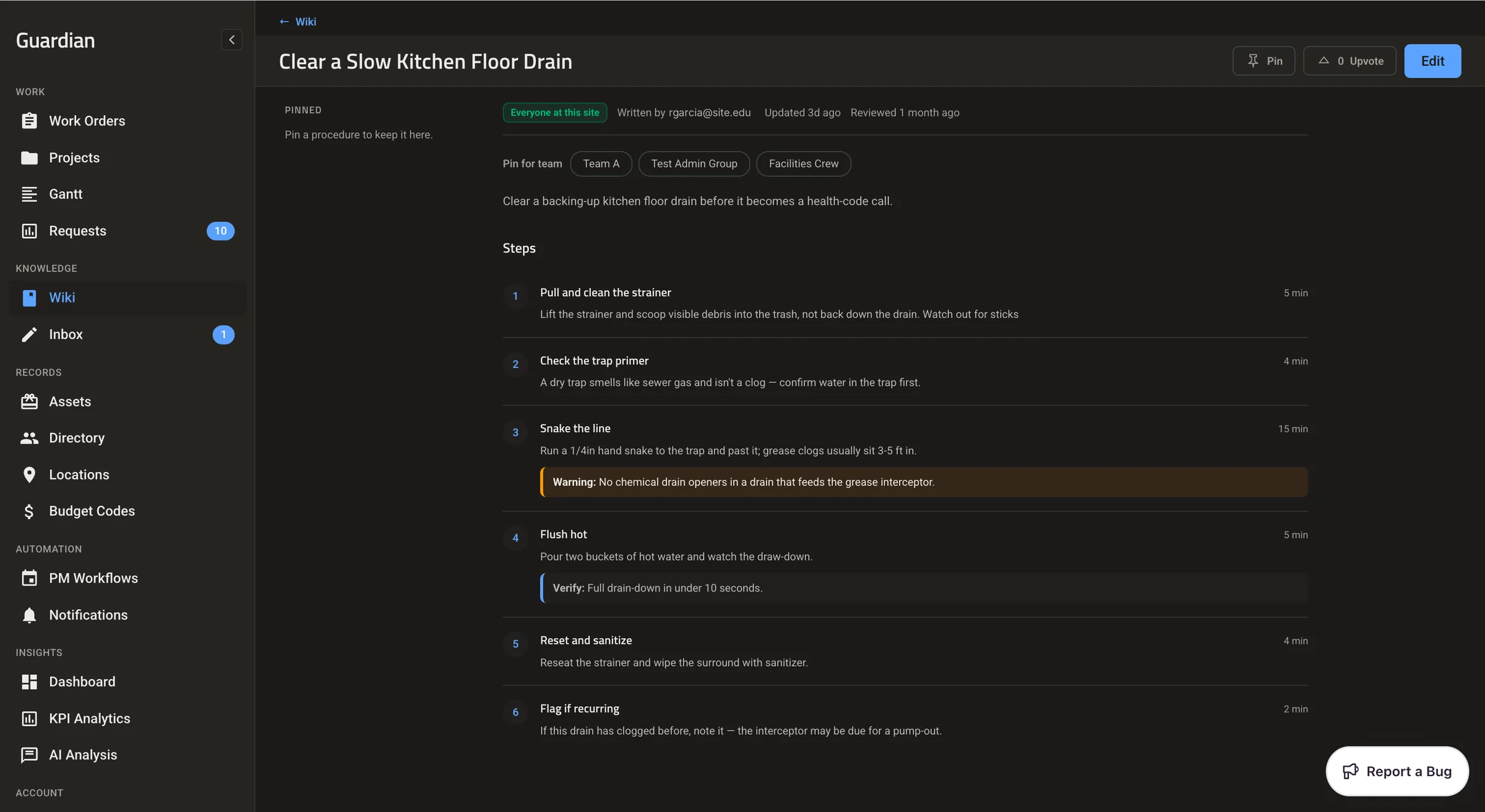
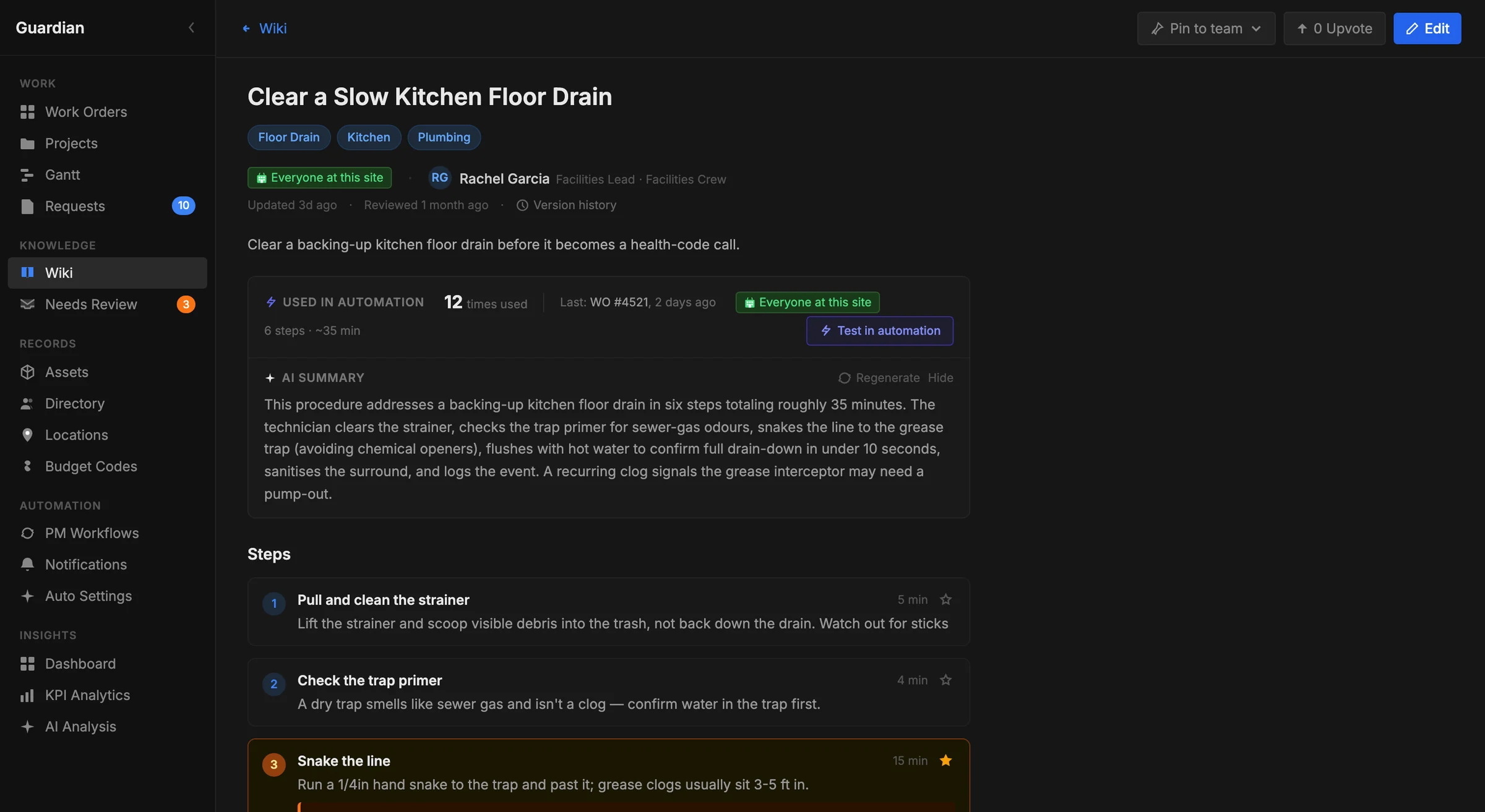
Owned at a glance · Fixes issue U1
Author name and role
Each page shows the author’s name, role and team, with a badge for who can see it. Readers know whose knowledge it is and who to ask.

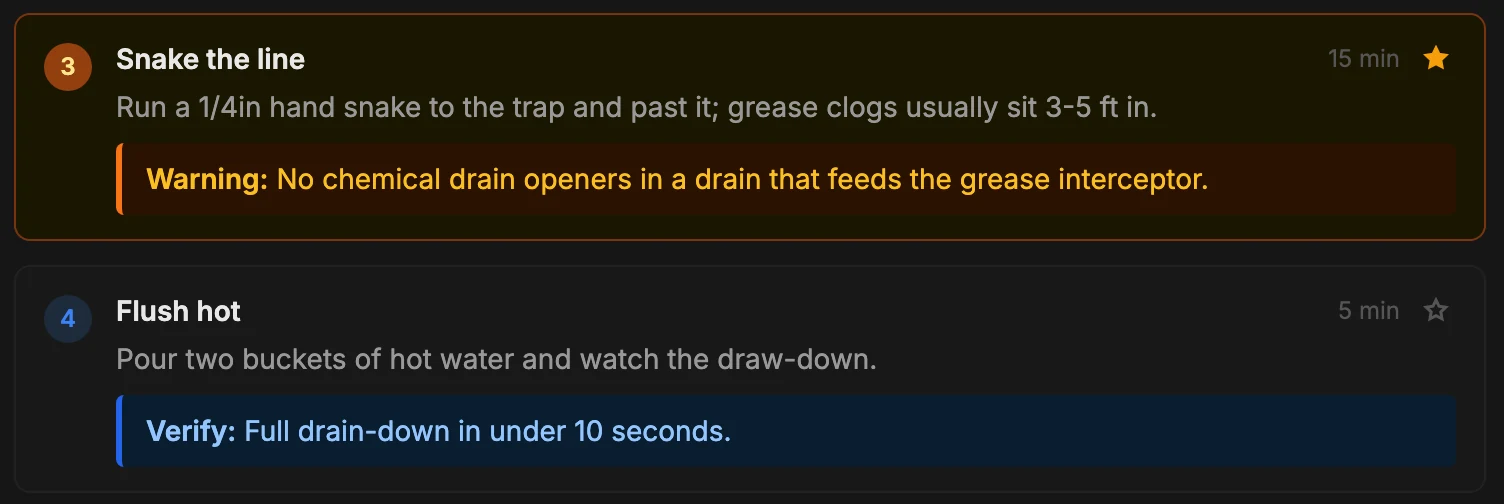
Shape first · Fixes issue U2
Key steps and safety callouts
Authors can star a critical step so it stands out in the reading view. Warning and Verify lines get their own colours, so they are easy to find mid-job.
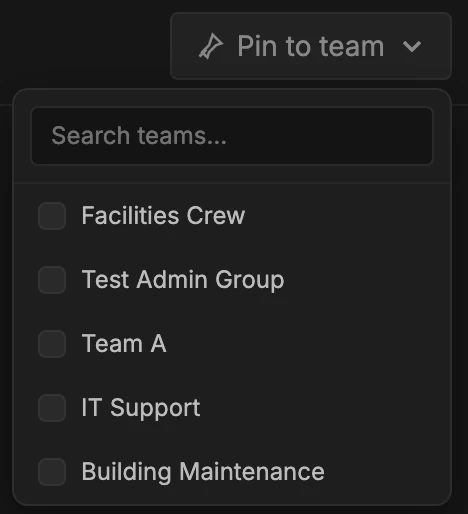
Owned at a glance · Fixes issue U2
Pin to team
Pinning a page for a team uses a searchable list. It works the same with 5 teams or 50.
AI suggests, people decide · Fixes issue U3
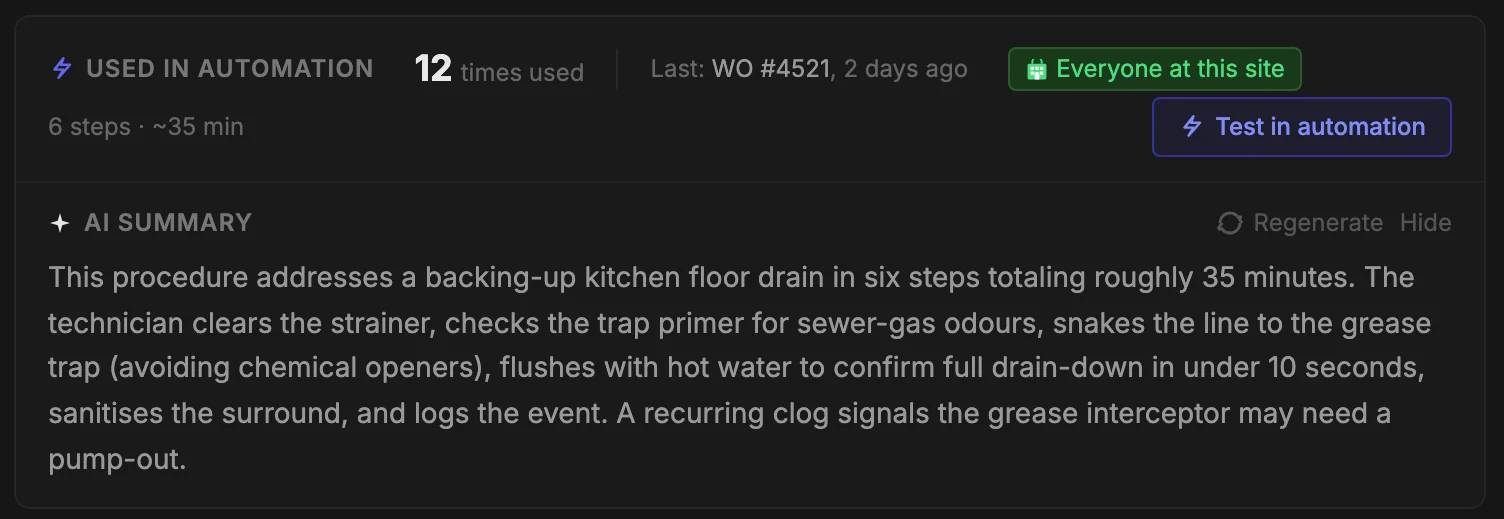
Automation usage
A small module shows how often the AI agent has used the page and the last work order it answered. Authors can also test how the agent would match a question to it.
Owned at a glance · Fixes issue U4
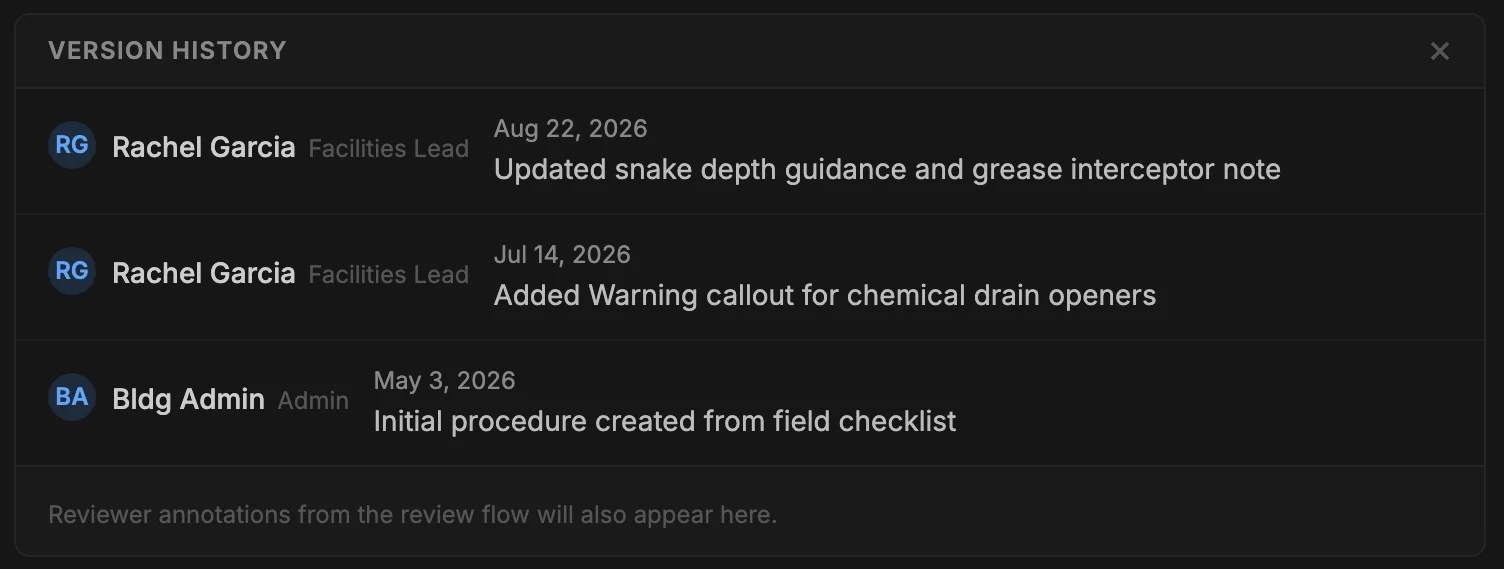
Version history
Every edit is listed with its author, date and a short summary of the change. Reviewer notes from the review flow will appear here too.
Flow 04
Govern
Give reviewers a clear place to check changes and a simple way to say what needs fixing.
Full before-and-after view
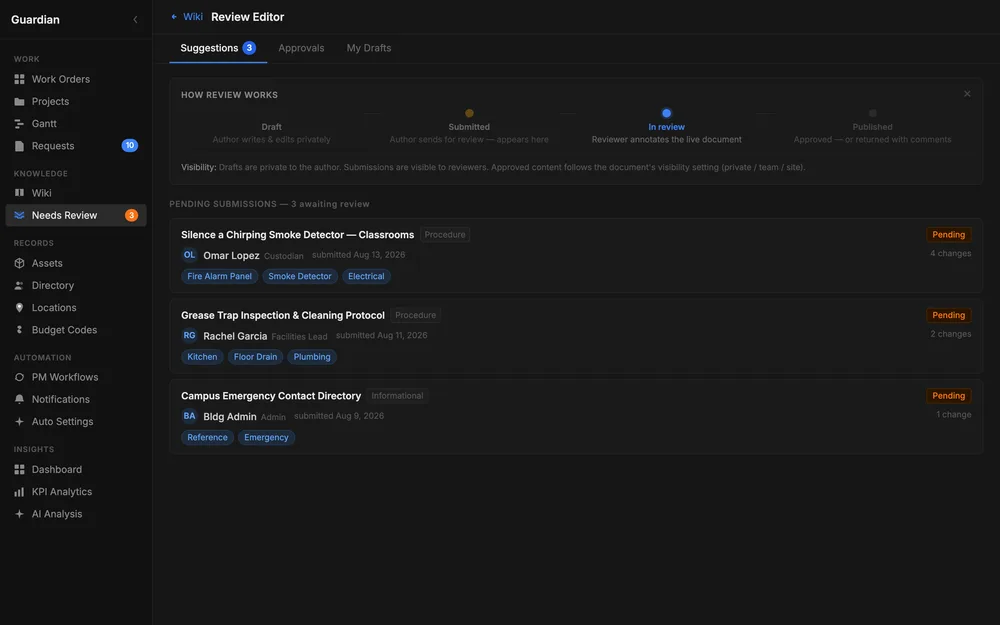
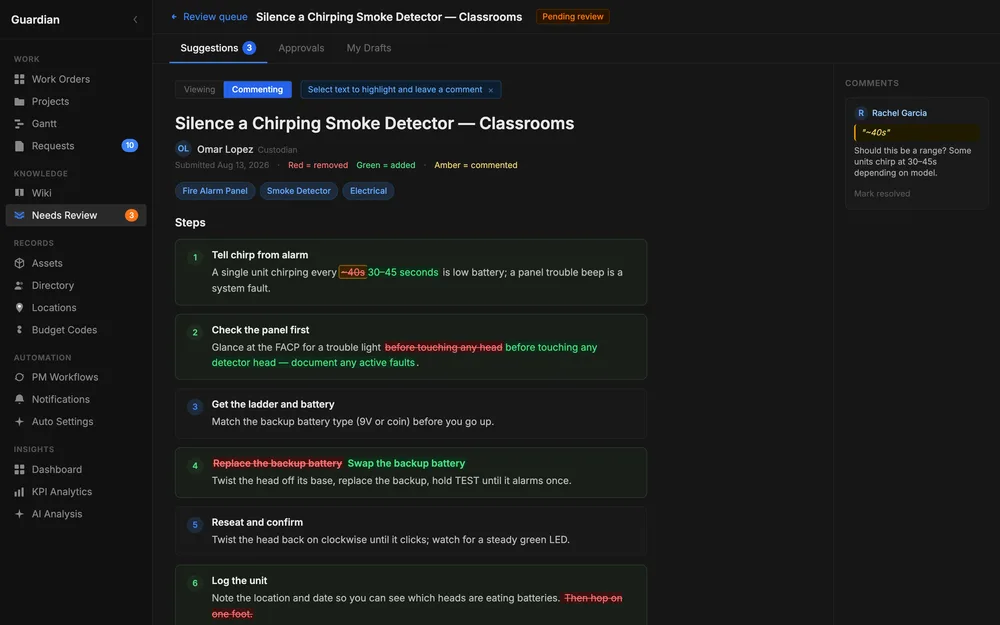
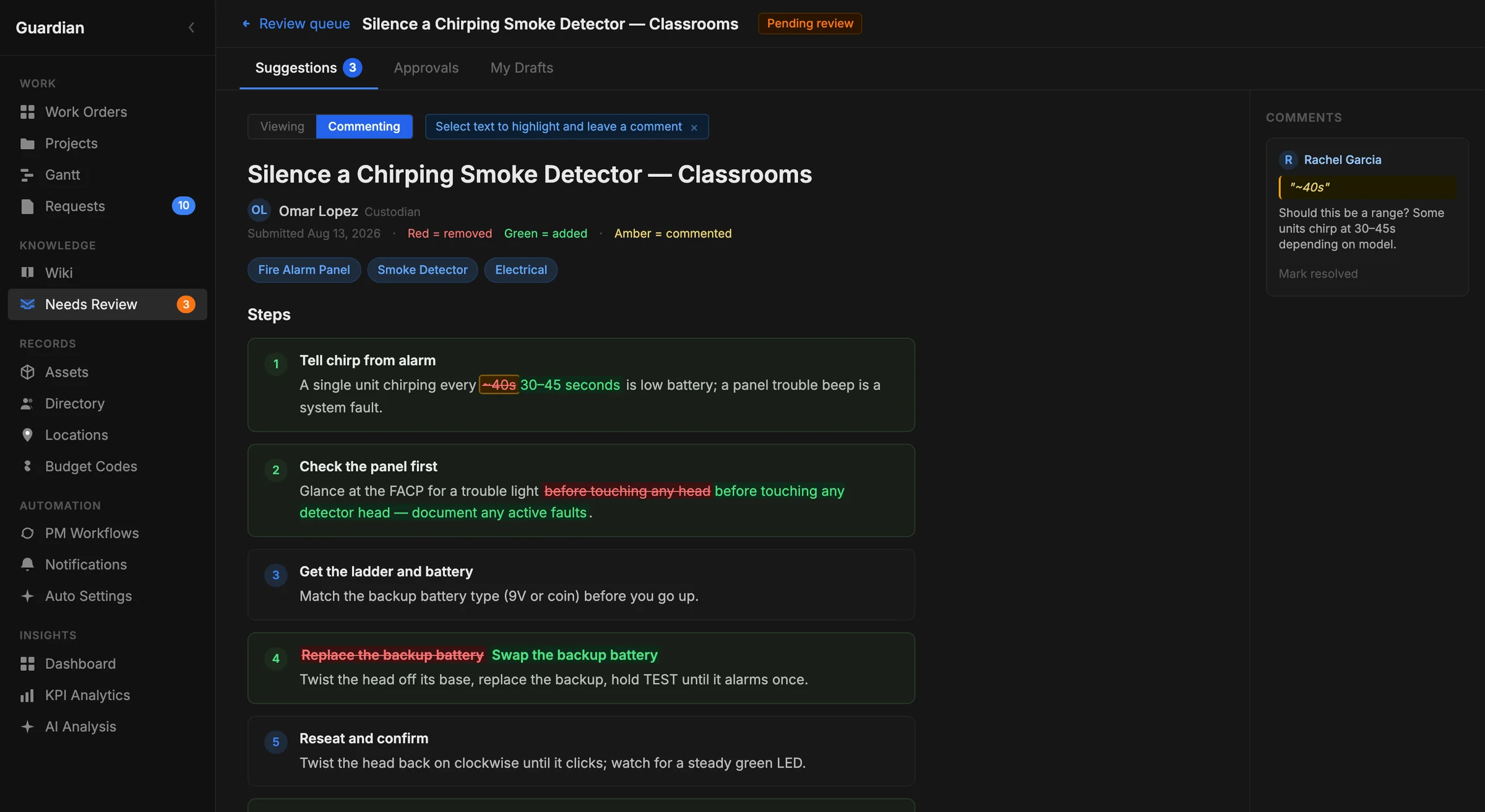
Every changed step is marked, with removed text in red and added text in green. Reviewers see the whole set of changes in one pass.
How should a reviewer approve an edit?
- AIn the prototype
Page-level accept
Accept or decline the whole edit.
ResultOnly step 1 shows what changed.
Trade-offOne bad step sinks the whole edit.
- BConsidered
Approve each step
Accept or reject every step on its own.
ResultA page can go live half-approved.
Trade-offSteps that depend on each other split apart.
- CChosen · Shipped
Step comments, one decision
See every change, comment on a step, decide once.
ResultFeedback lands on the exact step.
Trade-offReviewers read the full page before deciding.
Owned at a glance · Fixes issue G2
Inline comments and a clear decision
Reviewers select any phrase to leave a comment, the same way they would in Google Docs. They finish with Approve, Request changes or Reject, and the author sees every note.
Owned at a glance · Fixes issue G1
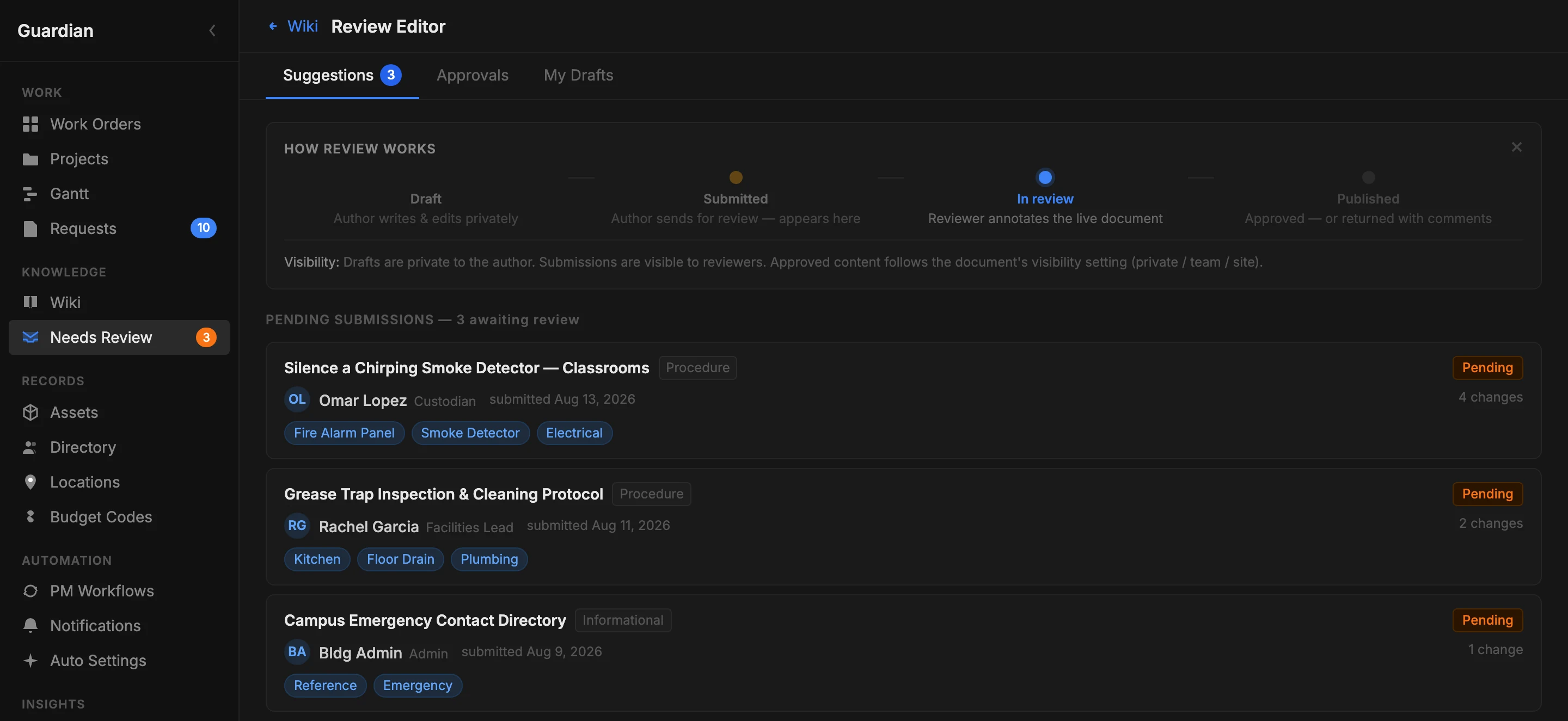
A dedicated review queue
Wiki reviews have their own Needs Review page with a count in the sidebar. A short guide at the top shows each stage, from draft to published, and who can see the page at each one.
AI Readiness
In phase 2, the AI agent answers work-order help requests with what people wrote in the wiki. The fields authors already fill in tell it where to look, what to show and where it helped.
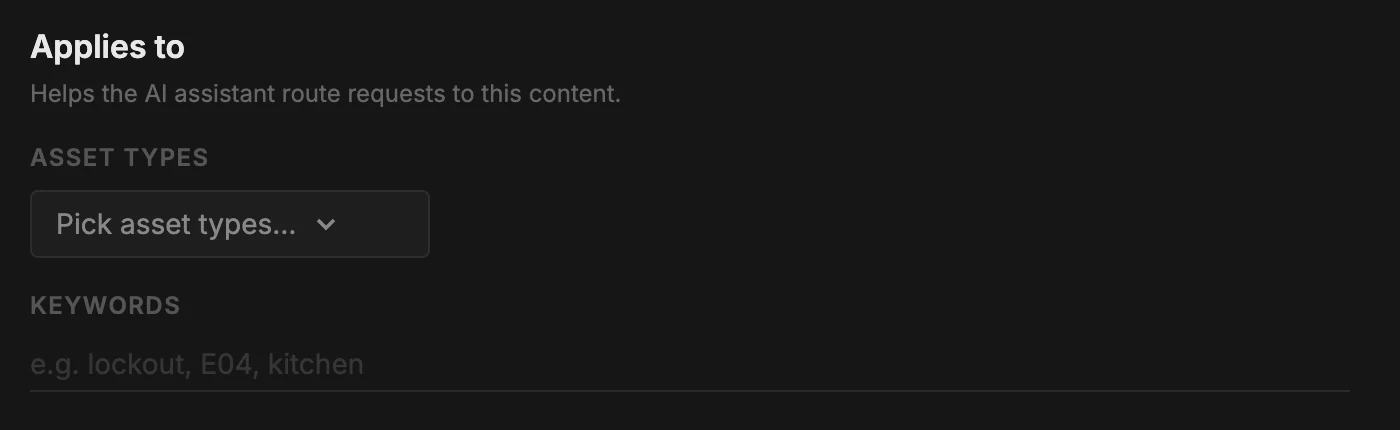
Routing
Categories, asset types and keywords match a request to the right page. The editor suggests them, so most pages get tagged as people write.
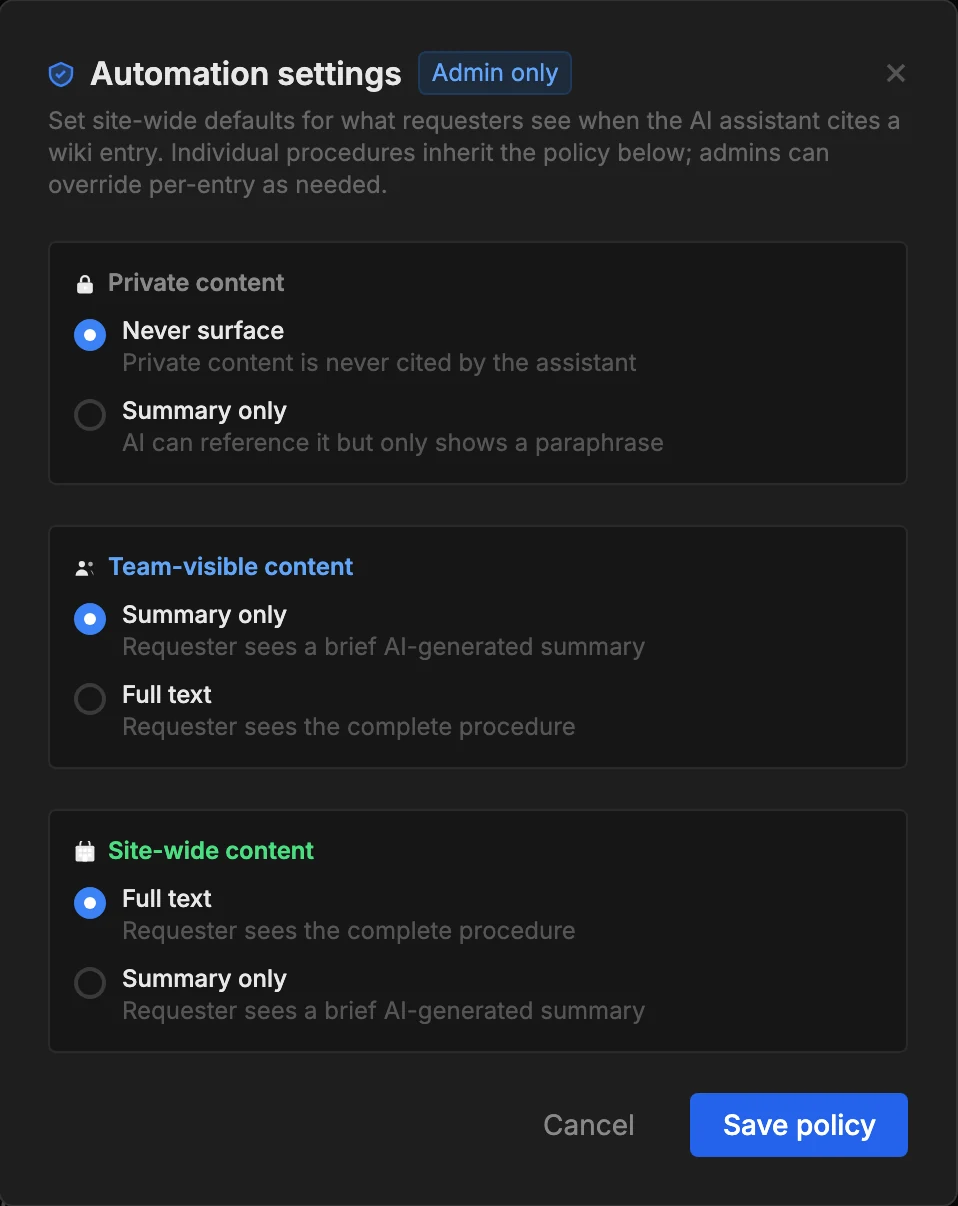
Answering
Admins set what a requester sees for each visibility level: the full procedure, a short AI summary, or nothing. Private pages are never shown by default.
Tracking
Each page shows how often the agent used it and for which work order. Authors can test how a question matches their page.
The usage bar and AI summary are shown on each procedure page (see Use).
Outcome
10 of the 15 fixes have shipped, 6 in full and 4 in part. Two of my proposals beyond the audit also shipped: job roles and related wikis.
4 screens · pick one, then click a pin
Wiki list
Live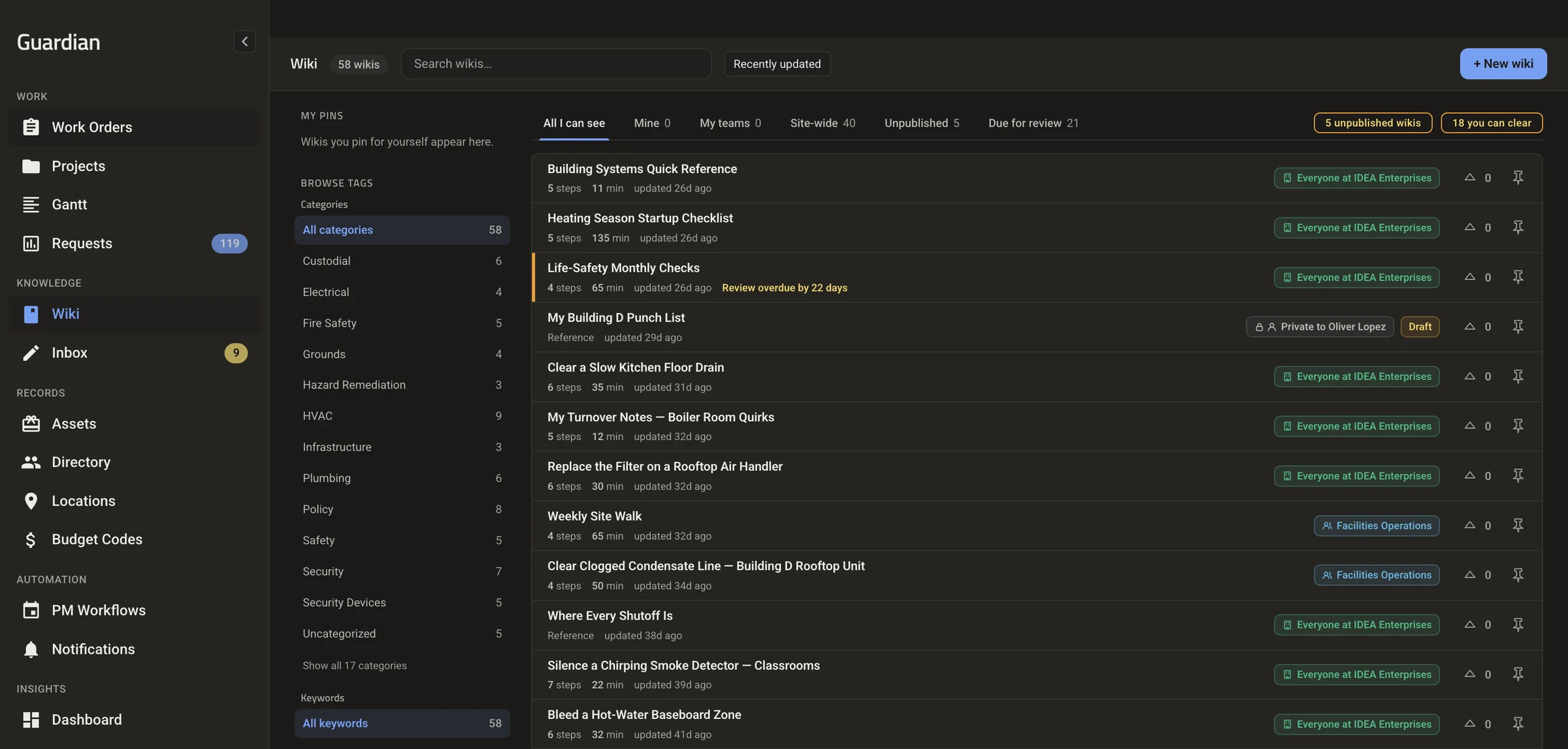
Original gap
F2 · Most pages uncategorized
A fixed category list that almost nobody fills in: 18 pages, 3 of them categorized.
Categories show how many pages each holds, and an Uncategorized bucket shows what still needs a tag.
Original gap
F3 · Visibility shown as an email
"Private to buildingadmin@…" names an address, not who can actually see the page.
Each row shows who can see it with an icon and a name: a building for everyone, a team icon, a lock for private.
Original gap
F4 · Conflicting filter states
Two different "selected" styles. The orange Drafts tab looks active even when it isn't.
Tabs share one underline style. Unpublished and clearable counts sit on their own and stay visible on every tab.
- issue F2Shipped
Most pages uncategorized Categories show how many pages each holds, and an Uncategorized bucket shows what still needs a tag.
- issue F3Shipped
Visibility shown as an email Each row shows who can see it with an icon and a name: a building for everyone, a team icon, a lock for private.
- issue F4Shipped
Conflicting filter states Tabs share one underline style. Unpublished and clearable counts sit on their own and stay visible on every tab.
Editor
Live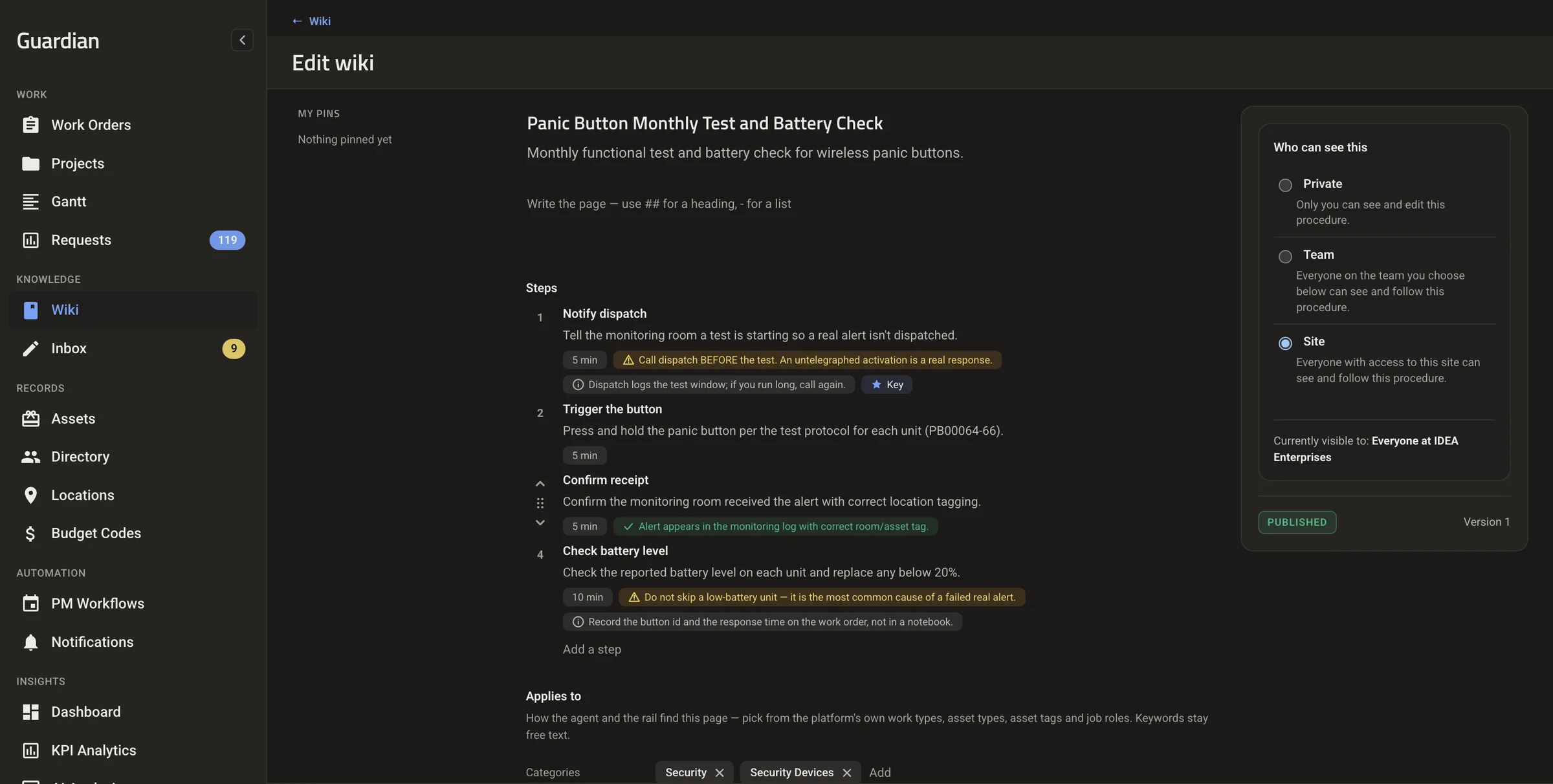
Original gap
C1 · Markdown-only editor
"Use ## for a heading" asks frontline staff to learn syntax before they can write.
Steps carry time, Warning, Verify, Note and Key labels from my step editor. The Markdown body above them is still there.
Original gap
C5 · Status in the wrong place
"Draft · Not yet saved" sits inside the editable settings card, where it reads like an option.
Draft or Published sits under the visibility panel, apart from the settings authors edit.
Applies to
Live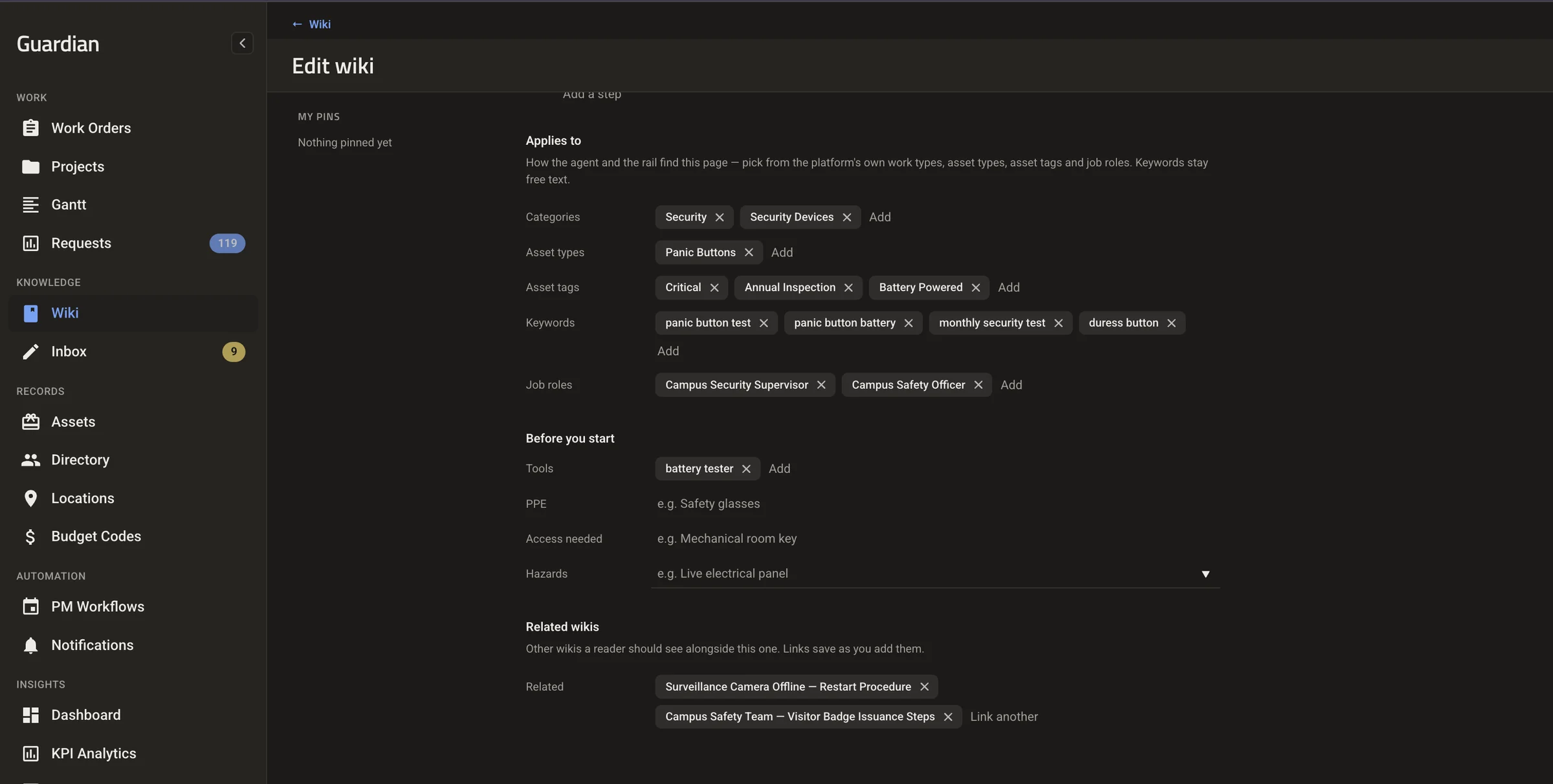
Original gap
C3 · Routing fields left blank
Categories, asset types and keywords are free text, so they stay empty and the agent has nothing to match on.
Categories, asset types and asset tags are picked from the platform’s own lists, so spelling stays consistent for search and the AI.
Added beyond the audit
My addition beyond the audit: pages are tagged with the job roles that use them, one more signal for routing.
Added beyond the audit
Also my addition: authors link pages a reader should see together, so one procedure leads to the next.
- issue C3Shipped
Routing fields left blank Categories, asset types and asset tags are picked from the platform’s own lists, so spelling stays consistent for search and the AI.
- JRAdded
My addition beyond the audit: pages are tagged with the job roles that use them, one more signal for routing.
- RWAdded
Also my addition: authors link pages a reader should see together, so one procedure leads to the next.
Review
Live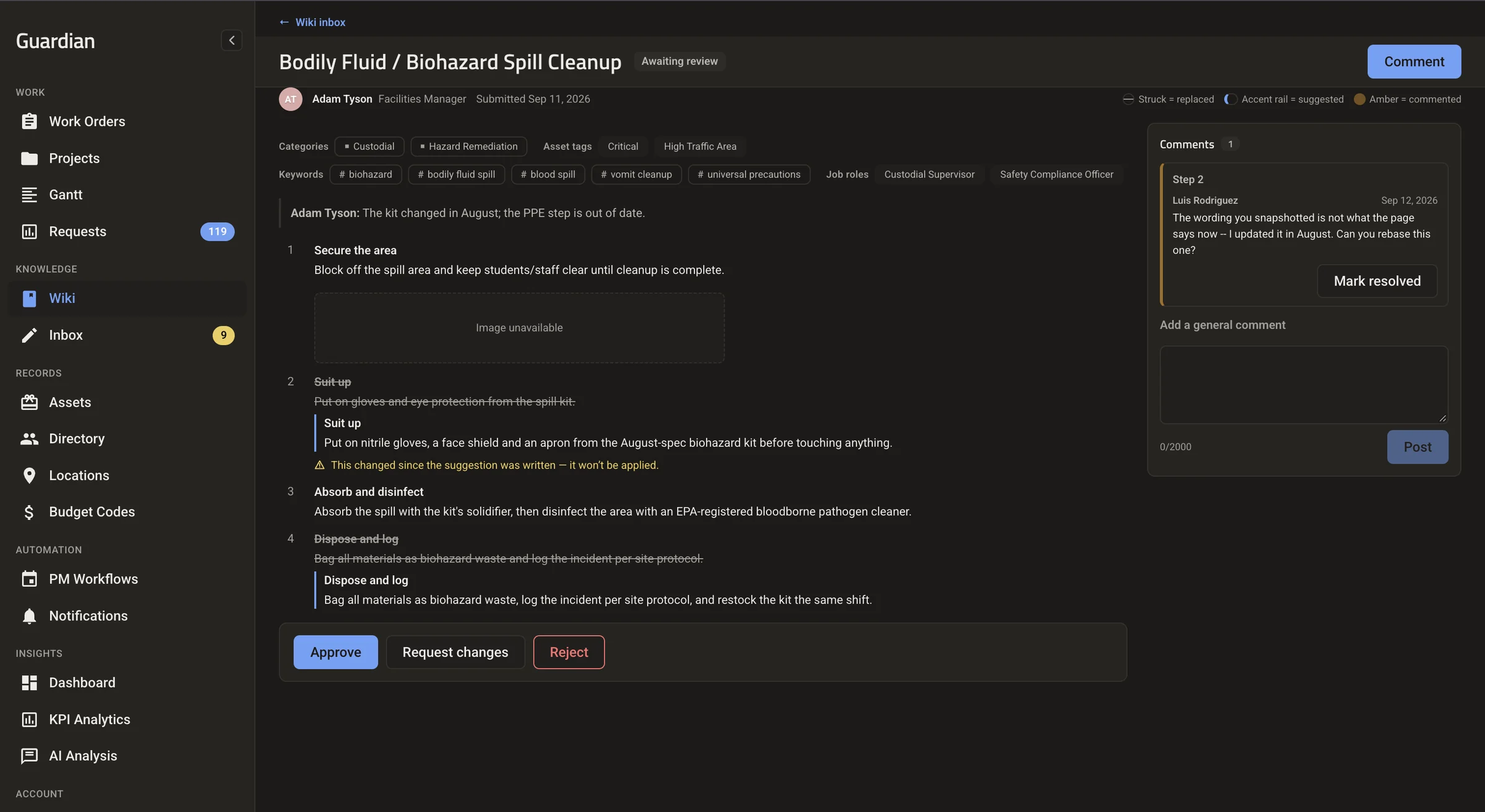
Original gap
G2 · All-or-nothing review
One Accept / Decline for the whole page, no inline comments, and only step 1 shows what changed.
Every changed step shows the old text struck through and the new text beside it. Reviewers comment on a step and choose Approve, Request changes or Reject.
- issue G2Shipped
All-or-nothing review Every changed step shows the old text struck through and the new text beside it. Reviewers comment on a step and choose Approve, Request changes or Reject.
Roadmap
- NowLive
Shipped 6
Partly shipped 4
Added
Job roles · Related wikis
- Next5 fixes
Migration
- C2No way to import a document
- LaterPhase 2
The AI agent answers work-order help requests from the wiki.
It routes on the tags, visibility and content types set up in this phase.
Metrics
- Unstructured
- Time to publish a first page (should go down)
- Pages written with the step editor (should go up)
Starting pointNot tracked yet
- Untraceable
- Review turnaround (should go down)
- Duplicate titles (should go down)
Starting point4 copies of one title
- Uncategorized
- Pages with a category (should go up)
- Requests the AI answers from the wiki (should go up)
Starting point3 of 18 pages categorized
Known starting points come from the engineering prototype.
Takeaways
Human first in AI product design
Four kinds of people share every page, many with little time at a computer. I designed for them first, and solving their problems gave the AI most of what it needed.
Audit before redesign
Starting from a working engineering draft, I audited before redesigning, which gave the CEO & PM, the engineer and me one shared list of gaps. If I ran it again, I’d put the redesign in front of two or three technicians right after the audit, and track the Metrics above after launch.
Directing AI as a solo designer
AI sped up the making. The design calls stayed mine. I used Claude to pressure-test my reasoning and Figma Make to turn each decision into a clickable flow the engineer could build from. Every AI-generated change had to trace back to a gap in the audit, or I cut it.